
Open Source Alternatives to PDF-XChange Editor
Scan Border Cropper is a browser-based alternative for users who need this focused result without installing a proprietary desktop app or entering a larger hosted workflow.
This research compares that workflow with PDF-XChange Editor while keeping the outbound source link at the bottom after the analysis.
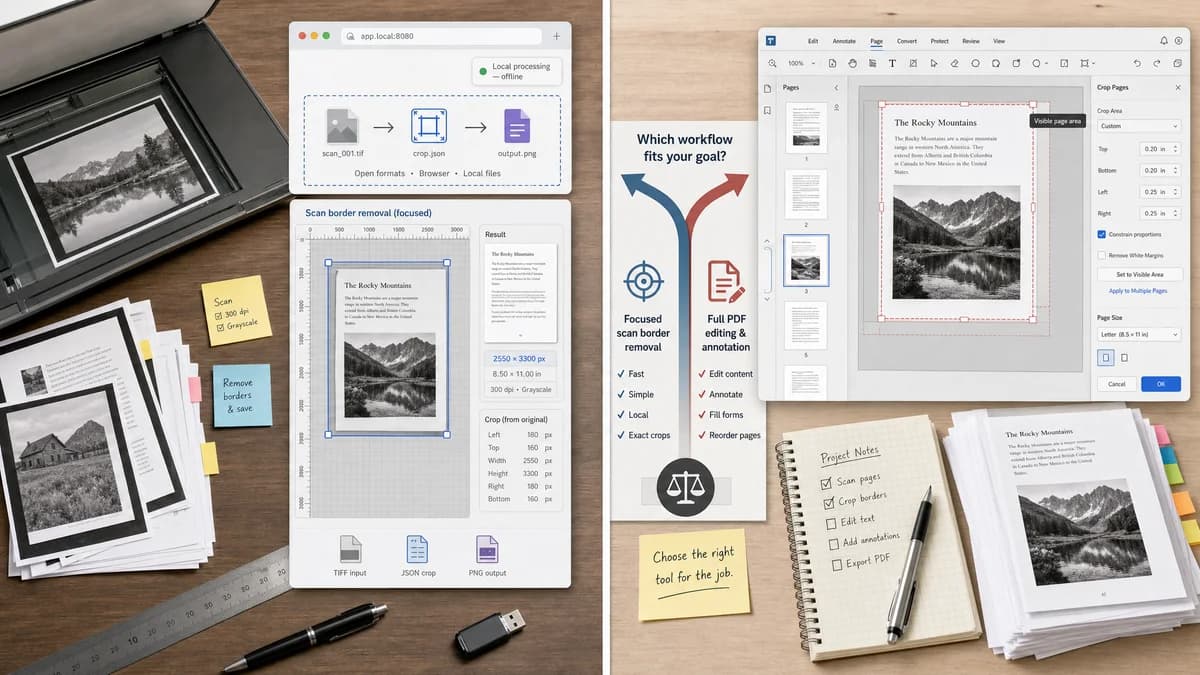
Why Scan Border Cropper fits
TextFaker can be positioned as a focused alternative for users who want automatic border removal from scanned images rather than a full PDF editor.
What PDF-XChange Editor offers
PDF-XChange Editor is a commercial PDF editor with crop page features and options for cropping visible page areas in PDF documents.
Open alternative signals
Format focus
Scan Border CropperImage files and raster crop outputs.
PDF-XChange EditorPDF files and PDF page cropping.
Automatic dark-edge cleanup
Scan Border CropperCan explicitly detect black or dark scanner margins.
PDF-XChange EditorForum discussion suggests white-border crop tools may not solve dark margins.
Content removal proof
Scan Border CropperOutput image dimensions and crop report verify removed border pixels.
PDF-XChange EditorPDF crop may adjust visible page area.
Installation
Scan Border CropperBrowser-based and mobile-friendly.
PDF-XChange EditorDesktop PDF editor.
Decision guide
Best for image scan cleanup, black or dark edge removal, and deterministic local exports.
Best for PDF-native editing, annotation, page organization, and Windows desktop PDF workflows.
Side-by-side open source alternative comparison
| Decision point | Scan Border Cropper | PDF-XChange Editor | Takeaway |
|---|---|---|---|
| Dark margins | Our workflowDedicated dark-border threshold mode with per-side border measurement. | Proprietary workflowPDF crop workflows may not automatically solve dark scan edges in all cases. | Dark-edge mode is essential for this tool. |
| PDF editing | Our workflowNo full PDF editing unless paired with existing PDF tools. | Proprietary workflowBroad PDF editing and annotation suite. | TextFaker should stay focused on scan cleanup. |
| Crop semantics | Our workflowRaster export discards pixels outside crop. | Proprietary workflowCrop may redefine visible PDF area depending on tool and settings. | Users sharing sensitive scans may prefer a generated cropped image. |
| Workflow speed | Our workflowUpload, auto-detect, adjust, download. | Proprietary workflowOpen PDF editor, choose crop workflow, configure pages. | A one-purpose tool can be faster for image scans. |
| Validation messages | Our workflowNo dark edge found, uneven border detected, crop may cut content, output dimensions changed. | Proprietary workflowPDF editor UI options and previews. | Machine-readable status is a TextFaker advantage. |
| Mobile | Our workflowDesigned for touch and camera uploads. | Proprietary workflowDesktop-first PDF editing. | Mobile cleanup expands the audience. |
Detailed research
Product Angle
PDF-XChange comparison users may have scanned PDFs with ugly dark borders. TextFaker can solve the image-level version first and later integrate with PDF page rendering if the project supports it.
- Lead with remove dark scan margins.
- Include black, white, and custom background modes.
- Show exact border pixels removed.
Demand Evidence
The PDF-XChange forum thread is especially relevant because the user explicitly asks whether dark margins from an ADF scanner can be removed automatically.
- ADF scanners create repeated edge artifacts.
- White-border crop is not enough for dark margins.
- Manual cropping is viewed as a last resort.
Implementation Notes
Offer a border color mode: auto, dark, light, and sampled corner. The sampled-corner option can make scanner-bed backgrounds deterministic without AI.
- Use corner sampling to estimate border color.
- Compute per-edge content transition thresholds.
- Expose threshold and minimum content area.
Testing
Fixtures should include black side bars, gray bottom bars, white margins, and mixed uneven borders. Each test should assert crop coordinates and status.
Research notes
- The PDF-XChange knowledge base explains crop pages and notes that cropping redefines visibility rather than necessarily removing content.
- A PDF-XChange forum user asks how to remove dark margins from ADF-scanned documents automatically and wonders if manual cropping is the only option.
- This is direct demand evidence for a specialized automatic scan-border cropper with dark-edge detection.
Official source
The proprietary product link is included once here for source checking after the alternative analysis.
Official PDF-XChange Editor source