
Open Source Alternatives to ScanSpeeder
Scan Border Cropper is a browser-based alternative for users who need this focused result without installing a proprietary desktop app or entering a larger hosted workflow.
This research compares that workflow with ScanSpeeder while keeping the outbound source link at the bottom after the analysis.
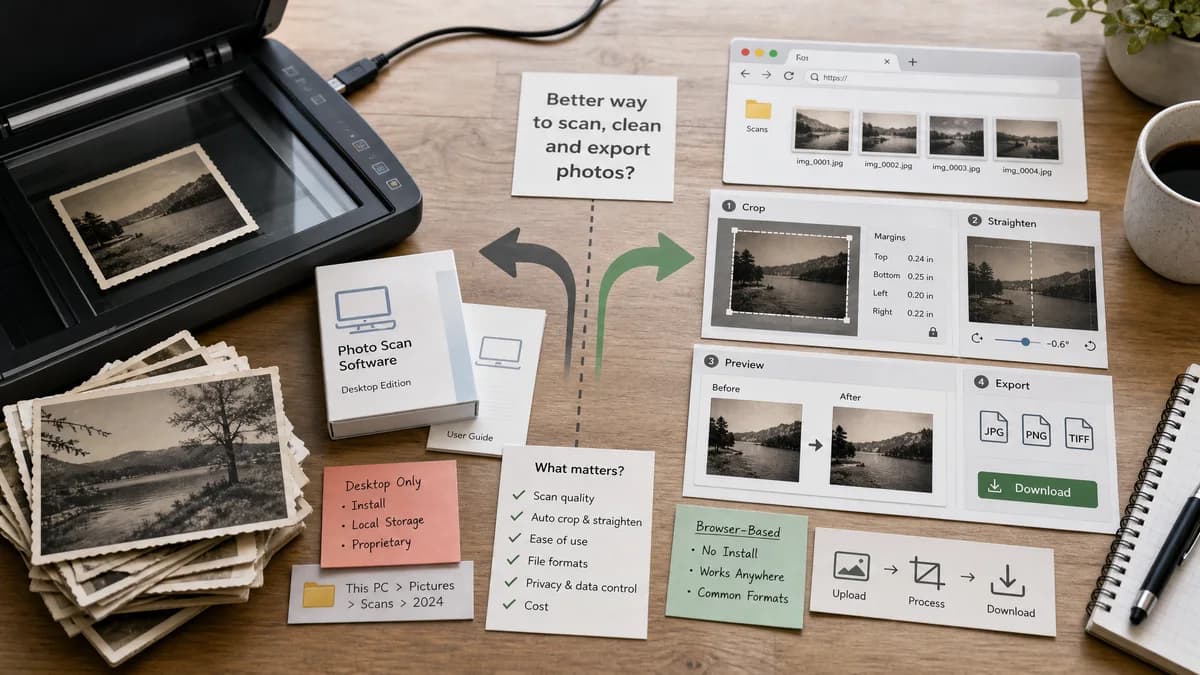
Why Scan Border Cropper fits
TextFaker can serve users who already have scanned files and need quick browser-based cleanup with deterministic crop boxes, border sizes, and downloadable outputs.
What ScanSpeeder offers
ScanSpeeder is a desktop product for scanning multiple photos on a flatbed scanner and automatically cropping and straightening them into separate image files.
Open alternative signals
Hardware integration
Scan Border CropperWorks after scanning from image files in the browser.
ScanSpeederIntegrates with flatbed scanner workflows on desktop.
Install requirement
Scan Border CropperNo install for supported browser image formats.
ScanSpeederDesktop software installation required.
Testable outputs
Scan Border CropperCrop boxes, dimensions, margins, warning messages, and file MIME can be verified automatically.
ScanSpeederThe main value is visual extraction and editing of scanned photos.
Audience
Scan Border CropperGeneral users with scans, receipts, documents, photos, or printed artwork.
ScanSpeederPhoto archive users digitizing albums with a scanner.
Decision guide
Best for users with existing JPG, PNG, WebP, or similar scans who want quick local cleanup from any modern browser, including mobile.
Best for users who want scanner-integrated desktop software for scanning albums and extracting many photos at once.
Side-by-side open source alternative comparison
| Decision point | Scan Border Cropper | ScanSpeeder | Takeaway |
|---|---|---|---|
| Input source | Our workflowUpload existing scan images or capture from mobile camera input. | Proprietary workflowScan from a flatbed or import pre-scanned images. | TextFaker should clearly state that it cleans already-created image files. |
| Automatic cropping | Our workflowDetect border/background areas and produce numeric crop rectangles. | Proprietary workflowAutomatically crops and straightens scanned photos into separate image files. | ScanSpeeder is stronger for scanner sessions; TextFaker is stronger for quick private file cleanup. |
| Batch reporting | Our workflowCan show a table of per-file crop status, removed pixels, final dimensions, and download links. | Proprietary workflowBatch workflow is centered on extracting and saving photos. | A deterministic report is a strong TextFaker differentiator. |
| Mobile access | Our workflowResponsive browser UI can work on phones and tablets. | Proprietary workflowDesktop scanning workflow. | Mobile-friendly cleanup broadens use beyond scanner workstations. |
| Privacy | Our workflowFiles stay in the browser for supported workflows. | Proprietary workflowDesktop-local software, also private but requires installation. | Both can be privacy-friendly; TextFaker wins on zero-install convenience. |
| Advanced photo features | Our workflowShould stay focused on crop, border, bleed, safe-zone, and export validation. | Proprietary workflowOffers photo enhancement and album-scanning features. | Avoid competing on restoration; compete on measurable crop cleanup. |
Detailed research
Product Angle
ScanSpeeder comparisons should acknowledge that scanner-integrated software is better for full archival scanning sessions. TextFaker should own the simpler post-processing job: drop in scanned files, find borders, crop, verify, download.
- Use clear language for already-scanned images.
- Avoid scanner driver claims.
- Offer batch drag-and-drop with a compact results table.
Validation Path
Automated tests can load synthetic images with known black, white, or gray borders and assert the crop box and output dimensions exactly.
- Test a 1000 by 800 image with a 50 pixel black border.
- Test uneven borders on all four sides.
- Test a no-border image and expect a no-crop-needed status.
Demand Evidence
The Photo StackExchange family album question and Reddit DataHoarder thread both point to the same user problem: large photo collections make repetitive crop operations unacceptable.
- Batch workflows are a demand signal.
- Manual crop fatigue is a demand signal.
- Existing desktop tools prove willingness to use specialized crop software.
Content Notes
The alternative page should explain the difference between scan acquisition and scan cleanup so users understand where a browser tool fits.
Research notes
- ScanSpeeder's official page highlights automatic crop, straighten, separate image files, scanner workflows, and batch photo digitization.
- Community discussions about family photo scanning show the central pain: scanning multiple photos per pass saves time, but manual cropping afterward becomes tedious.
- A TextFaker version should not try to control scanner hardware; it should focus on uploaded files and deterministic post-scan cleanup.
Official source
The proprietary product link is included once here for source checking after the alternative analysis.
Official ScanSpeeder source