
Open Source Alternatives to Sejda
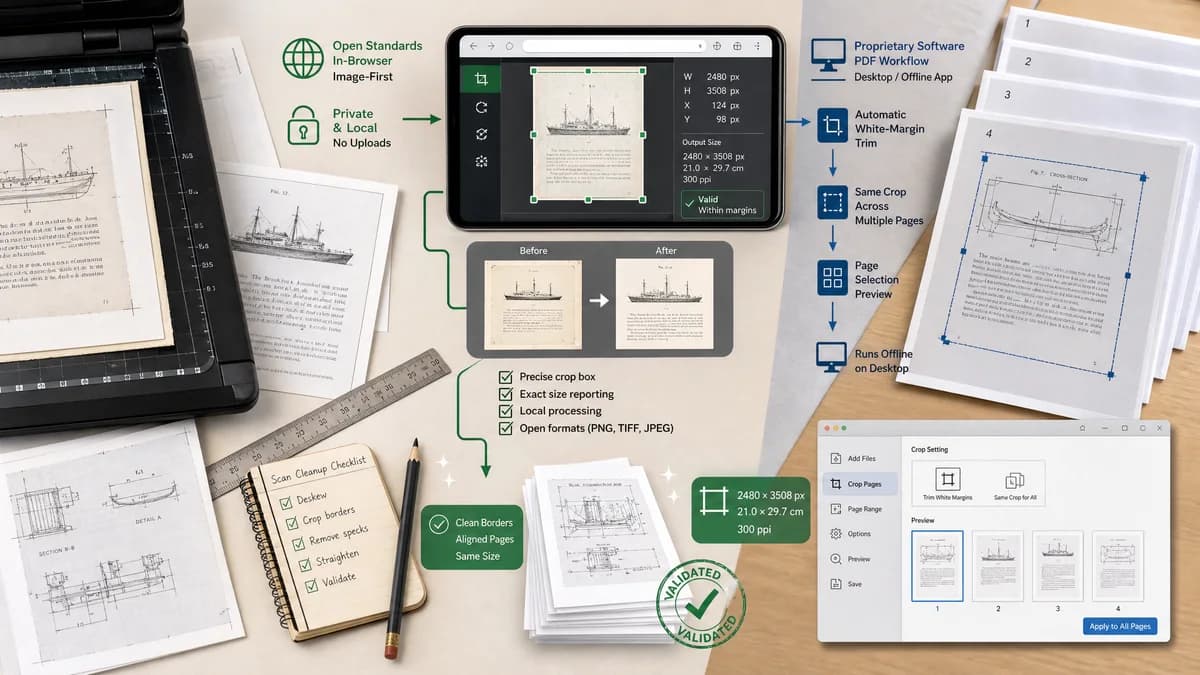
Scan Border Cropper is a browser-based alternative for users who need this focused result without installing a proprietary desktop app or entering a larger hosted workflow.
This research compares that workflow with Sejda while keeping the outbound source link at the bottom after the analysis.
Why Scan Border Cropper fits
TextFaker can offer a privacy-centered, image-first alternative to hosted PDF crop workflows by keeping scan cleanup in the browser and reporting exact crop data.
What Sejda offers
Sejda offers online PDF cropping with automatic white-margin trimming, same-size crop across pages, and preview-based crop selection; it also promotes a desktop version for offline work.
Open alternative signals
Input type
Scan Border CropperBrowser-decodable image files first.
SejdaPDF files.
Processing location
Scan Border CropperLocal browser processing for supported workflows.
SejdaOnline upload by default, with a desktop option promoted for offline work.
Border colors
Scan Border CropperLight, dark, and sampled border modes.
SejdaOfficial page emphasizes white-margin cropping.
Output data
Scan Border CropperDimensions, crop boxes, border sizes, and validation statuses.
SejdaCropped PDF download after preview or automatic selection.
Decision guide
Best for image scans, photos, slides, receipts, and documents where exact pixel crop data and local browser processing matter.
Best for PDF users who need online PDF margin trimming or desktop PDF tools.
Side-by-side open source alternative comparison
| Decision point | Scan Border Cropper | Sejda | Takeaway |
|---|---|---|---|
| White margins | Our workflowCan remove white borders around scanned images and report exact pixels removed. | Proprietary workflowAutomatically trims white PDF margins. | Both address white margins, but TextFaker should be image-local and numeric. |
| Dark borders | Our workflowDark-border preset can target black scanner bars and ADF shadows. | Proprietary workflowCrop page primarily positions around PDF margin trimming. | Dark scan edges are a strong differentiator. |
| Privacy | Our workflowNo upload for image crop processing. | Proprietary workflowOnline service uploads files, with desktop option for offline work. | Local browser processing should be prominent. |
| Page preview | Our workflowImage preview with crop handles and numeric fields. | Proprietary workflowPDF page preview and crop-area selection. | A simpler image preview can be faster for non-PDF users. |
| Batch outputs | Our workflowBatch image exports and JSON/CSV report. | Proprietary workflowCropped PDF document output. | TextFaker should serve image batch cleanup rather than PDF assembly. |
| Automated verification | Our workflowExact crop state can be asserted in tests. | Proprietary workflowPDF output requires PDF-specific checks. | Deterministic browser state is important for TextFaker tooling. |
Detailed research
Product Angle
Sejda is a useful comparison for users who know the phrase crop PDF margins. TextFaker can target the adjacent need: crop scan borders before or outside a PDF workflow.
- Mention image-first workflow.
- Offer dark and light border presets.
- Report every crop numerically.
Demand Evidence
Sejda's product proves established demand for margin cropping, while forums around scanned dark edges prove a gap for non-white scanner artifacts.
- White-margin trimming is common in PDF tools.
- Dark scanner margins need separate handling.
- Users want automatic crops but still need preview and correction.
Implementation Notes
For custom border mode, sample the corners and outer strips, then find where pixels diverge from the estimated background by a configurable color distance.
- Expose sampled border color as HEX/RGB.
- Allow users to lock one side if the crop is too aggressive.
- Report confidence score and rejected crop reason.
SEO Fit
Target terms include Sejda alternative, crop PDF scan margins, remove white margins from scan image, and remove black scan border.
Research notes
- Sejda's official crop page describes automatic white-margin cropping and previewing pages to choose crop areas.
- Public scan-border discussions show that many users need dark-border and photo-border removal, not only white PDF margin trimming.
- TextFaker should provide light and dark border detection, plus a custom sampled-border mode.
Official source
The proprietary product link is included once here for source checking after the alternative analysis.
Official Sejda source