
Open Source Alternatives to VueScan
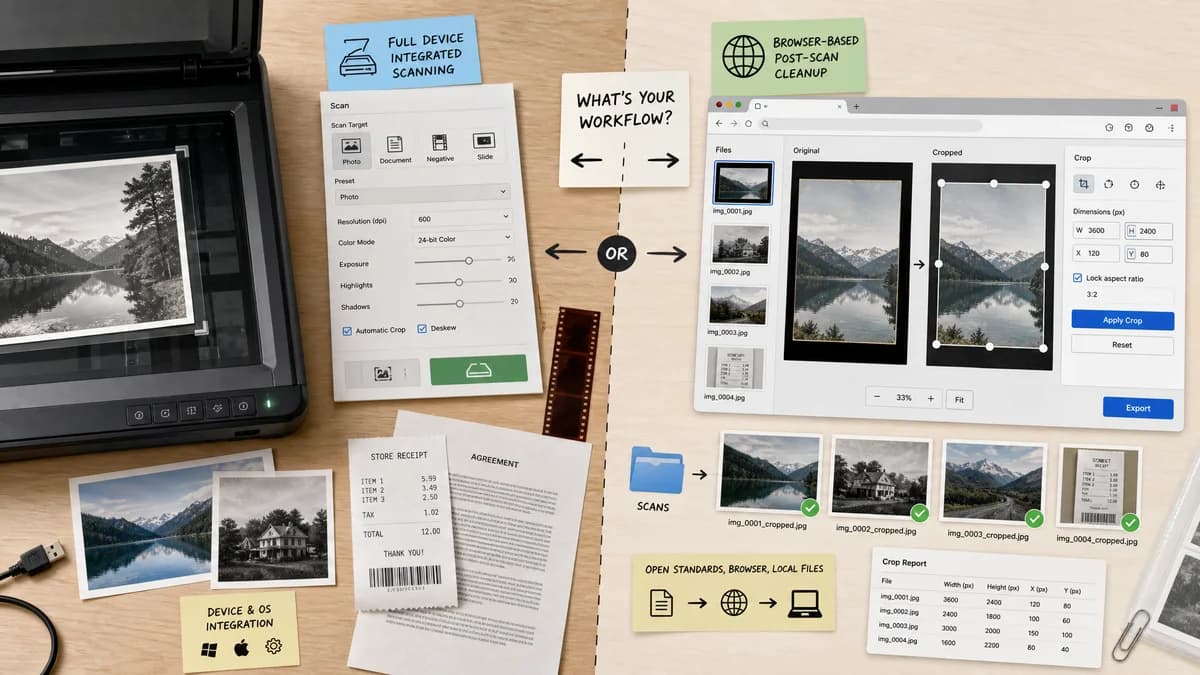
Scan Border Cropper is a browser-based alternative for users who need this focused result without installing a proprietary desktop app or entering a larger hosted workflow.
This research compares that workflow with VueScan while keeping the outbound source link at the bottom after the analysis.
Why Scan Border Cropper fits
TextFaker can complement or replace a small slice of VueScan for users who only need post-scan border cropping and do not need scanner drivers, raw scan controls, or device integration.
What VueScan offers
VueScan is a scanner application for macOS, Windows, and Linux with automatic crop features for photos, slides, documents, receipts, and other scan targets.
Open alternative signals
Scanner control
Scan Border CropperDoes not control scanner hardware; processes uploaded files.
VueScanControls scanners and manages acquisition settings.
Crop transparency
Scan Border CropperShows crop boxes and exact border sizes before export.
VueScanProvides crop controls inside the scanning interface.
Operating system reach
Scan Border CropperBrowser reach including phones and tablets.
VueScanDesktop apps for major operating systems.
Best evidence source
Scan Border CropperSynthetic file tests and user-visible numeric validation.
VueScanScanner preview and automatic crop behavior.
Decision guide
Best for cleaning existing scans in a browser with numeric crop validation and no scanner setup.
Best for controlling scanners, creating scans, and using scanner-specific auto-crop and media detection features.
Side-by-side open source alternative comparison
| Decision point | Scan Border Cropper | VueScan | Takeaway |
|---|---|---|---|
| Use case boundary | Our workflowPost-process scans, photos, and document images already saved as files. | Proprietary workflowAcquire scans directly from scanner hardware and auto-crop during scanning. | TextFaker should describe itself as scan cleanup, not scanner software. |
| Auto-crop behavior | Our workflowDeterministic threshold settings and visible crop rectangles. | Proprietary workflowAutomatic crop settings within a scanner preview workflow. | Transparent parameters help when auto-crop is inconsistent. |
| Output checks | Our workflowReports final dimensions, crop box, file type, size, and safe-zone warnings. | Proprietary workflowSaves scan output according to scanner and app settings. | TextFaker can be easier to test and audit. |
| Installation | Our workflowNo app install after loading the web page. | Proprietary workflowRequires desktop software installation. | Browser access is simpler for occasional cleanup tasks. |
| Batch files | Our workflowCan batch-process files with browser memory limits and per-file statuses. | Proprietary workflowSupports scanning workflows with scanner-device constraints. | Batch upload is useful for users who already scanned a folder. |
| Advanced scan features | Our workflowShould not attempt color calibration, scanner profiles, or film scanning controls. | Proprietary workflowIncludes scanner-specific and media-specific scanning capabilities. | A focused cropper will be easier to ship and verify. |
Detailed research
Product Angle
VueScan comparison traffic may include users who need scanner support, so the page should be honest: TextFaker is for saved scan images, not device acquisition. That honesty can still win users whose actual task is removing borders after scanning.
- Use plain distinctions between scanning and cleanup.
- Offer drag-and-drop batch mode.
- Let users copy crop settings from one file to another.
Validation Path
A test suite can create known bordered images, run the browser algorithm, and assert crop boxes and warnings. No human review is needed for core functionality.
- Assert cropX and cropY values.
- Assert final width and height.
- Assert status codes such as cropped, noBorderDetected, and cropTooAggressive.
Demand Evidence
VueScan discussions around auto-crop inconsistency and broader forum questions about black scan margins show users need both automation and a way to inspect or correct the result.
- Auto-crop failure is an opportunity for transparent parameters.
- Users scanning slides, photos, and receipts need slightly different presets.
- A local browser tool can serve one-off cleanup without entering a scanner app.
Feature Scope
Keep version one focused on rectangular border removal. Perspective correction can be a later tool if document corners and camera scans become the main use case.
Research notes
- VueScan's official site and crop manual describe automatic and manual cropping controls, including crop options in the scanning workflow.
- A Reddit VueScan discussion reports inconsistent auto-cropping behavior, which suggests users need transparent correction and validation when automatic detection fails.
- TextFaker should avoid claiming scanner replacement; it should focus on deterministic cleanup after files exist.
Official source
The proprietary product link is included once here for source checking after the alternative analysis.
Official VueScan source