
Visa Photo File Size Checker vs ImgSmaller Compress Image to 240KB
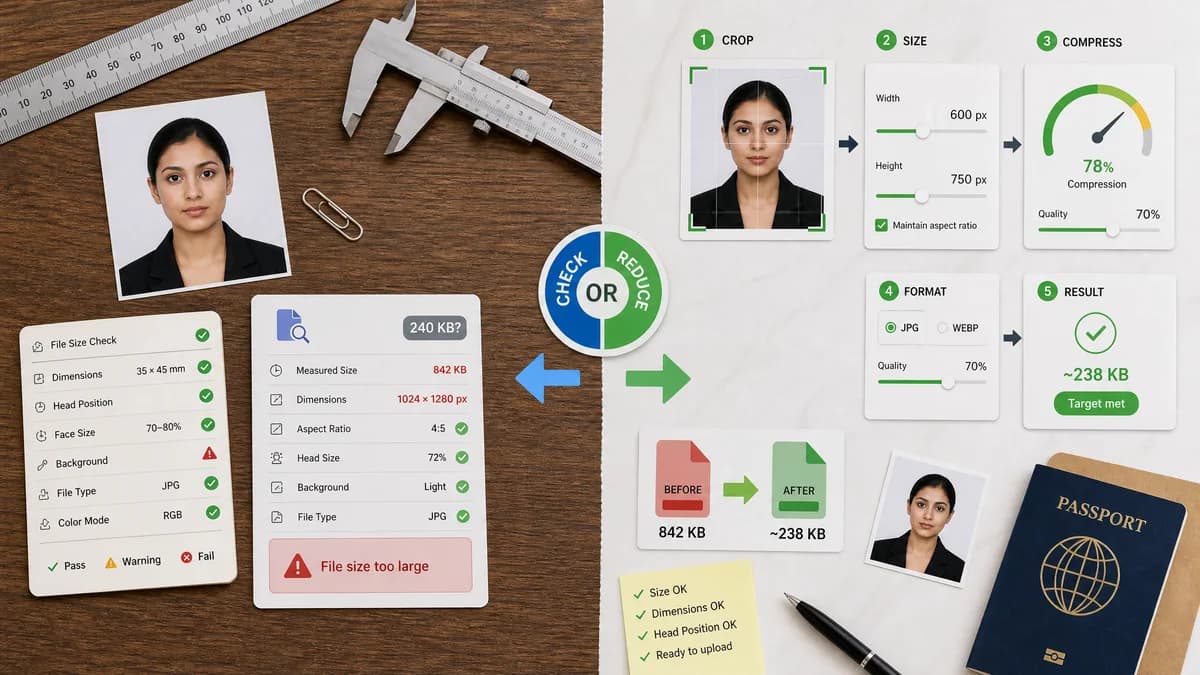
Visa Photo File Size Checker is the baseline in this comparison: Check whether a visa photo file fits common upload limits before submitting it, with browser-local size, format, dimensions, aspect ratio, and custom KB target results.
A tool for compressing images to a 240 KB target with optional local zero-upload mode and editing controls.
Quick verdict
ImgSmaller is better when a file is already known to be too large and the user wants to reduce it. TextFaker is better for confirming whether a file is actually too large and whether other visa constraints also fail.
How Visa Photo File Size Checker fits
Visa Photo File Size Checker would verify an existing file’s measured status against 240 KB or other limits, but would not automatically compress or change the image.
How ImgSmaller Compress Image to 240KB fits
ImgSmaller focuses on producing an image near a requested target size, including 240 KB, with crop, width/height, compression, and format options.
Side-by-side comparison
| Decision point | Visa Photo File Size Checker | ImgSmaller Compress Image to 240KB | Takeaway |
|---|---|---|---|
| Primary outcome | Our workflowPass/fail diagnostic report. | Competitor workflowCompressed output image. | Checker first, compressor second is a safer workflow. |
| 240 KB support | Our workflowCan validate exact threshold and overage. | Competitor workflowTargets 240 KB compression. | Both address the common U.S.-style threshold differently. |
| Other visa rules | Our workflowCan check dimensions, aspect ratio, format, and file size together. | Competitor workflowGeneral target-size compression with optional crop and dimensions. | TextFaker can tell users if a small file is still wrong format or wrong shape. |
| Quality risk | Our workflowNo compression artifacts because no output is generated. | Competitor workflowCompression may soften detail depending on target and source. | TextFaker avoids unnecessary edits. |
| Privacy | Our workflowLocal-only by product requirement. | Competitor workflowClaims optional zero-upload mode. | Both can appeal to privacy needs if implemented as stated. |
| Test path | Our workflowValidate fixture file states exactly. | Competitor workflowCompression output size may vary by encoder and settings. | TextFaker’s promises are more deterministic. |
Use Visa Photo File Size Checker when
- Confirming whether compression is needed
- Checking dimensions and format as well as file size
- Avoiding accidental quality loss
- Generating copyable pass/fail diagnostics
Use ImgSmaller Compress Image to 240KB when
- Reducing file size to 240 KB
- Iterative compression and resizing
- Users who want local compression options
Detailed comparison
Demand Signal
A dedicated 240 KB compressor exists because many forms and portals impose small file limits. Public discussions show that users often compress too far and damage readability or image quality.
- Users need to know if they are over by 5 KB or 5 MB.
- They also need to know if dimensions are the real problem.
Workflow
TextFaker can be the first and last step around compression: check the original, compress elsewhere if needed, then check the result.
- Show exact overage before compression.
- Show whether compressed file still meets dimensions.
- Warn if file is under size but wrong type.
Implementation Guidance
Use exact byte comparison and display dual units. Avoid rounding a failing file into an apparent pass.
- Example: 245,761 bytes should fail a 245,760-byte binary threshold.
- Display rounded values with enough precision.
- Keep internal comparisons integer-based.
Content Notes
Comparison pages can emphasize that a target-size compressor is adjacent, not identical. A file can be under 240 KB and still fail because it is PNG, too small, too large, or not square.
- Focus on measurable multi-rule validation.
- Avoid subjective quality claims.
- Recommend official portal requirements as the source of truth.
Research notes
- ImgSmaller official page describes compressing to 240 KB, optional crop/dimension controls, and zero-upload mode.
- Reddit r/travel thread shows users struggling to compress visa images under 300 KB without blocky results.
- TextFaker should help users avoid unnecessary or excessive compression by checking first.
Official source
The only outbound competitor link on this page is placed here for source checking after the comparison.
Official ImgSmaller Compress Image to 240KB source