
Visa Photo File Size Checker vs ResizePixel
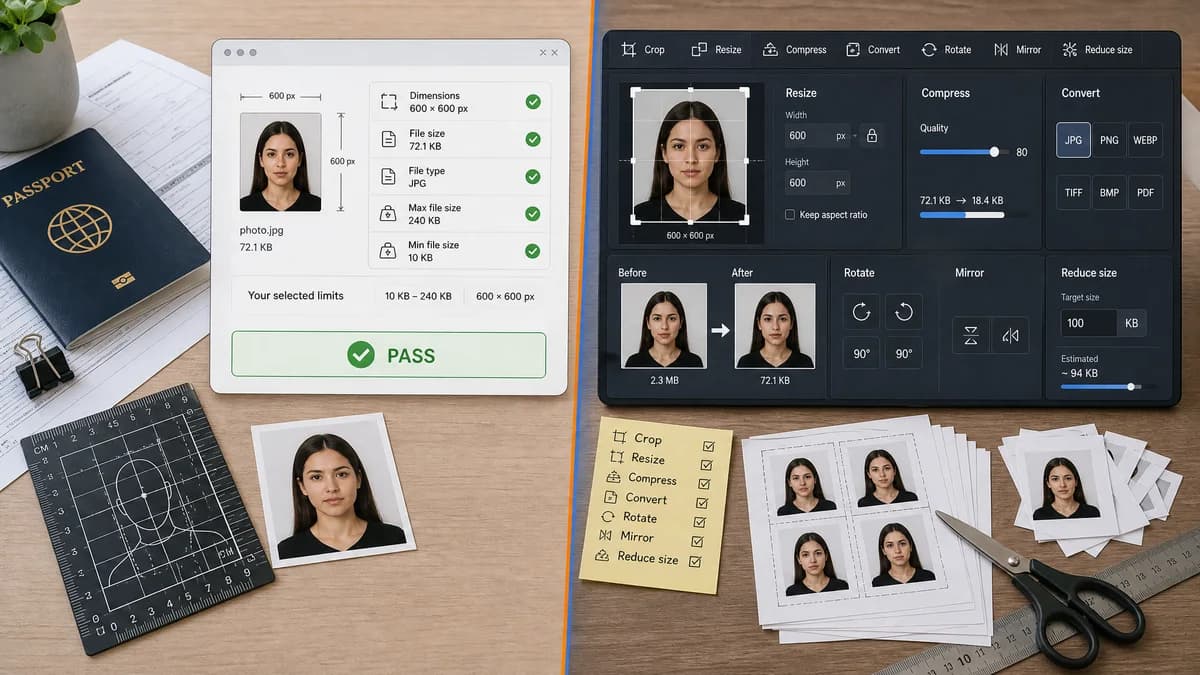
Visa Photo File Size Checker is the baseline in this comparison: Check whether a visa photo file fits common upload limits before submitting it, with browser-local size, format, dimensions, aspect ratio, and custom KB target results.
A general online image editor offering crop, resize, convert, compress, and reduce image size tools.
Quick verdict
ResizePixel is better for manual image edits. TextFaker is better for determining whether an edited file now satisfies visa-photo file-size and dimension rules.
How Visa Photo File Size Checker fits
Visa Photo File Size Checker would be visa-specific and validation-first, translating raw image facts into pass/fail results for selected photo upload limits.
How ResizePixel fits
ResizePixel is a broad image utility suite that helps users manually resize, crop, compress, convert, rotate, mirror, and reduce image file size.
Side-by-side comparison
| Decision point | Visa Photo File Size Checker | ResizePixel | Takeaway |
|---|---|---|---|
| Specificity | Our workflowVisa photo preflight rules and presets. | Competitor workflowGeneral image editing tools. | TextFaker can reduce user interpretation work. |
| Action model | Our workflowCheck and report. | Competitor workflowEdit and export. | Users may use both sequentially. |
| Rule explanation | Our workflowMaps file facts to visa upload constraints. | Competitor workflowProvides editing tools but not necessarily visa-specific pass/fail. | TextFaker can be clearer for non-technical applicants. |
| Custom size limits | Our workflowCan validate custom max KB after a user edits elsewhere. | Competitor workflowIncludes reduce image size functionality. | ResizePixel may help fix; TextFaker confirms. |
| Output stability | Our workflowNo output file changes. | Competitor workflowGenerates new image files. | TextFaker has less risk of accidental quality loss. |
| Testing | Our workflowDeterministic measured outputs. | Competitor workflowEditing outputs may vary by settings and browser encoding. | Checker behavior is easier to verify robustly. |
Use Visa Photo File Size Checker when
- Visa-specific validation
- Exact threshold reporting
- Users unsure which property failed
- Local no-upload checking if implemented as browser-only
Use ResizePixel when
- Manual crop and resize workflows
- General image conversion and compression
- Users who know the exact edit they need
Detailed comparison
Demand Signal
Forum advice often tells applicants to use general tools like Paint, Preview, or online resizers. This shows users are piecing together a workflow without a visa-specific diagnostic layer.
- Users confuse resolution and compression.
- Users repeatedly resize until under a threshold.
Product Role
TextFaker can become the after-edit checkpoint: upload, check, edit elsewhere if needed, return and verify.
- Show all failing rules at once.
- Offer internal links to relevant TextFaker resize/compress tools when available.
- Keep the checker itself read-only.
Implementation Guidance
Because browser JPEG export can vary by encoder, avoid promising a generated target size in this checker. Limit the tool to measuring the actual uploaded file.
- Use File.size as authoritative.
- Use createImageBitmap or Image decode for dimensions.
- Fallback to header parsers where useful.
Mobile Fit
On mobile, applicants may not know file properties. The checker should read the file directly from the camera roll and provide a compact diagnosis.
- Large touch targets.
- No dense tables as the only output.
- Download/copy report optional.
Research notes
- ResizePixel official page lists resize, crop, convert, compress, and reduce image size functions.
- Reddit r/travel commenters advise reducing resolution rather than only increasing compression, confirming need for diagnostics that distinguish dimensions from bytes.
- TextFaker can recommend the type of fix without implementing every editor action in this tool.
Official source
The only outbound competitor link on this page is placed here for source checking after the comparison.
Official ResizePixel source