
Visa Photo File Size Checker vs U.S. Department of State Photo Tool
Visa Photo File Size Checker is the baseline in this comparison: Check whether a visa photo file fits common upload limits before submitting it, with browser-local size, format, dimensions, aspect ratio, and custom KB target results.
Official U.S. tool for cropping a selected image for passport or visa-style photo use.
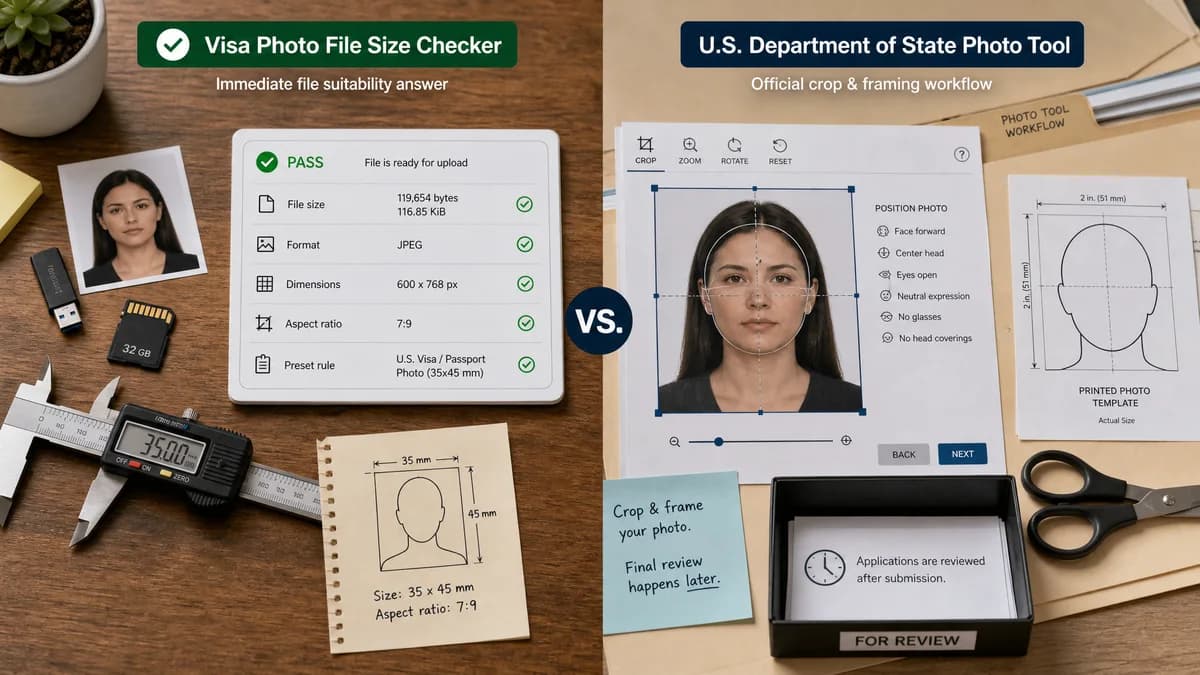
Quick verdict
Use the official tool when a U.S. applicant needs the government crop workflow. Use TextFaker when the immediate question is whether a file is the right size, format, and pixel dimensions before entering an application portal.
How Visa Photo File Size Checker fits
Visa Photo File Size Checker would focus on local, deterministic measurement and pass/fail validation: file bytes, KiB, format, dimensions, aspect ratio, and preset rule status before a user attempts an upload.
How U.S. Department of State Photo Tool fits
The State Department tool is authoritative for U.S. crop framing but is primarily a crop utility and official guidance states that the broader photo decision is still reviewed later.
Side-by-side comparison
| Decision point | Visa Photo File Size Checker | U.S. Department of State Photo Tool | Takeaway |
|---|---|---|---|
| Primary job | Our workflowMeasure and validate file properties locally. | Competitor workflowCrop a photo to a required square output. | The tools answer different parts of the same upload problem. |
| File-size output | Our workflowShows exact bytes, decimal KB, binary KiB, threshold, and pass/fail. | Competitor workflowNot positioned as a detailed file-size reporter. | TextFaker can make the file-size reason transparent. |
| Rule coverage | Our workflowCan include multiple country or portal presets plus custom min/max KB rules. | Competitor workflowFocused on U.S. photo cropping guidance. | TextFaker can cover broader visa upload constraints. |
| Local processing | Our workflowDesigned to run in the browser without upload. | Competitor workflowOfficial web tool flow; processing behavior is not framed as a general privacy feature. | Local-only processing is a differentiator for sensitive identity photos. |
| Quality judgment | Our workflowAvoids aesthetic or identity judgments; reports only measurable file facts. | Competitor workflowOfficial guidance says final acceptability is determined later by staff. | Both should avoid claiming guaranteed acceptance from visual judgment. |
| Testability | Our workflowSynthetic fixtures can verify bytes, dimensions, MIME, and threshold status. | Competitor workflowCrop UI behavior is harder to test as a static comparison page claim. | TextFaker has a strong deterministic test path. |
Use Visa Photo File Size Checker when
- Checking exact file size before upload
- Comparing one file against multiple visa presets
- Privacy-sensitive users who only need local inspection
- Automated QA with deterministic pass/fail outputs
Use U.S. Department of State Photo Tool when
- U.S. applicants wanting an official crop tool
- Paper-form or in-person workflows that match the tool scope
- Users who prefer government-provided interfaces
Detailed comparison
Demand Signal
Public discussions show users reaching the U.S. photo tool only after encountering unclear size, compression, or upload failures. They need a quick preflight check before they commit to a government portal step.
- Source notes mention confusing errors such as overly compressed images and large files.
- Users trade manual workarounds in Paint, Preview, email, and resizing tools.
Product Gap
The official tool is trusted but narrow. A measurement-first tool can complement it without pretending to replace government review.
- Show exact measured values.
- Explain which rule failed.
- Link users conceptually to crop/compress steps without performing hidden edits.
Implementation Guidance
Use File API metadata plus browser image decoding. For JPEG, PNG, WebP, AVIF, and HEIC when supported, report decoded dimensions; for unsupported formats, still report file bytes and type warnings.
- Preset: US visa digital image, JPEG, square, 600-1200 px, max 240 KB.
- Deterministic result object: status, failures, warnings, measured values.
- Do not claim face, background, recency, or acceptance validation.
Mobile Fit
The use case often starts from phone photos. The UI should make file picking, camera roll selection, and immediate result reading comfortable on small screens.
- Large upload target.
- Compact pass/fail cards.
- Copyable report for support or application notes.
Research notes
- Official State Department pages support 600 x 600 crop and 600-1200 px square requirements, while also warning that the tool does not check all quality.
- Reddit demand source: users report passport/photo tool errors and discuss resizing to specific pixels or avoiding over-compression.
- Position TextFaker as a checker, not an official acceptance engine.
Official source
The only outbound competitor link on this page is placed here for source checking after the comparison.
Official U.S. Department of State Photo Tool source