
Visa Photo File Size Checker vs Visa Resizer
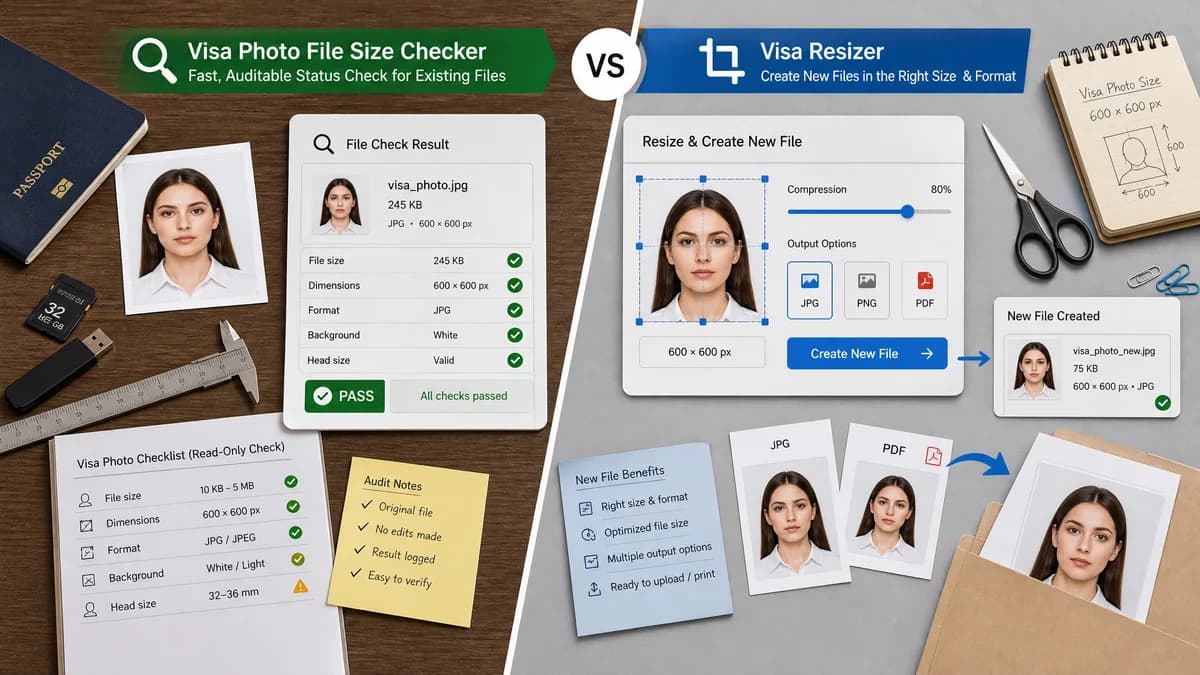
Visa Photo File Size Checker is the baseline in this comparison: Check whether a visa photo file fits common upload limits before submitting it, with browser-local size, format, dimensions, aspect ratio, and custom KB target results.
A web tool for resizing, cropping, compressing, and converting visa photos with custom KB and MB limits.
Quick verdict
Visa Resizer is better when the user wants to create a new file. TextFaker is better when the user wants a fast, auditable status check on an existing file.
How Visa Photo File Size Checker fits
Visa Photo File Size Checker would give a read-only diagnostic result for the selected file, making it clear why a file passes or fails before any edit is attempted.
How Visa Resizer fits
Visa Resizer is more action-oriented: users upload a photo, set dimensions or file-size limits, and generate a resized or compressed result, including PDF options.
Side-by-side comparison
| Decision point | Visa Photo File Size Checker | Visa Resizer | Takeaway |
|---|---|---|---|
| Workflow type | Our workflowRead-only checker. | Competitor workflowEditor and generator. | TextFaker can be simpler and lower risk for users who only need diagnosis. |
| Privacy model | Our workflowShould process entirely in the browser by design. | Competitor workflowStates files are processed directly in the browser. | Both can appeal to privacy-sensitive applicants. |
| Output | Our workflowStructured report, pass/fail, warnings, and copyable measurements. | Competitor workflowResized, compressed, or converted image/PDF output. | The competitor solves creation; TextFaker solves verification. |
| Custom thresholds | Our workflowCan support country presets and custom min/max file-size rules. | Competitor workflowSupports custom KB/MB limits for resizing and compression. | Both should handle non-U.S. portals with different limits. |
| Risk of hidden changes | Our workflowNo pixel or compression changes in checker mode. | Competitor workflowChanges image dimensions, compression, or file container. | Read-only behavior is valuable when users want to preserve an accepted studio photo. |
| Automated tests | Our workflowValidate exact known outputs for fixture files. | Competitor workflowGeneration quality may require more varied output assertions. | TextFaker can provide more deterministic comparison-page promises. |
Use Visa Photo File Size Checker when
- Preflight checking an already edited visa photo
- Users who do not want automatic changes
- Explaining exact KB and pixel failures
- Testable local validation
Use Visa Resizer when
- Resizing or compressing files to a target
- Batch photo or PDF workflows
- Users who want output generation in the same tool
Detailed comparison
Demand Signal
Visa Resizer exists because users face strict KB, MB, dimension, and PDF submission limits. A checker can capture the same demand while avoiding overbroad editing scope.
- Public forum users ask how to get under small KB limits.
- Some users are not sure whether resolution or compression is the issue.
Positioning
TextFaker should not compete on automatic photo editing. Its value is transparent diagnostics and fewer surprises before upload.
- Measured file-size facts first.
- Clear next-step suggestions second.
- No acceptance guarantee.
Implementation Guidance
Provide presets as data: label, accepted MIME/extensions, min/max dimensions, aspect rule, maxBytes, optional minBytes, and notes.
- Expose a JSON-like result for tests.
- Use exact byte comparisons, not rounded display values.
- Show rounded KB only as display.
UX Notes
Users who arrive from a rejection message need a short answer immediately: too large, too small, wrong format, wrong dimensions, or appears OK by measurable rules.
- Use a result summary at the top.
- List all failures, not just the first one.
- Allow custom KB limit entry.
Research notes
- Visa Resizer claims browser processing, custom KB/MB limits, visa photo compression, resizing, and PDF conversion.
- Reddit r/travel discussion confirms user confusion around compressing visa images below 300 KB without destroying quality.
- Adjacent tool proves the market, while TextFaker can keep scope narrower and easier to verify.
Official source
The only outbound competitor link on this page is placed here for source checking after the comparison.
Official Visa Resizer source