
Wallet Photo Sheet Maker vs Mpix Wallet Prints
Wallet Photo Sheet Maker is the baseline in this comparison: Make a browser-local printable photo sheet with exact wallet photo sizes, gutters, margins, crop modes, repeat counts, and verified PNG dimensions.
Mpix offers wallet and mini-wallet photo prints with professional paper options and shipping.
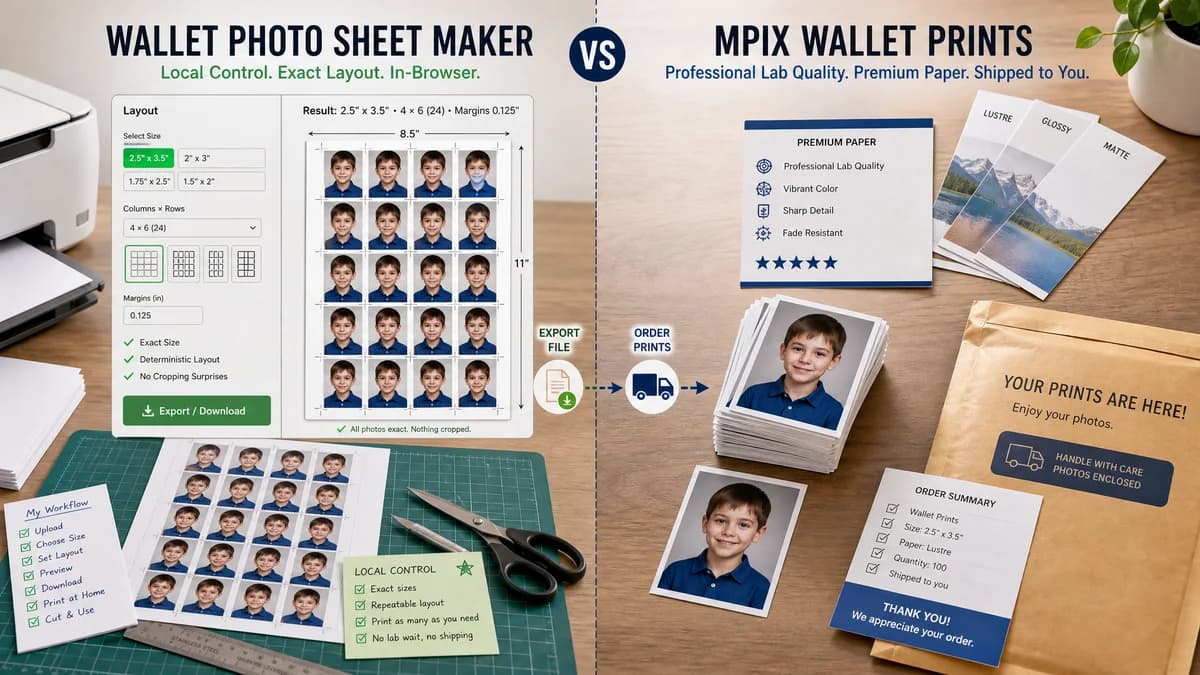
Quick verdict
TextFaker should compete on local control and deterministic layout, not on paper stock or color-managed lab output.
How Wallet Photo Sheet Maker fits
Wallet Photo Sheet Maker would focus on producing exact wallet sheets locally, including common sizes and custom layouts, without providing lab printing.
How Mpix Wallet Prints fits
Mpix is a strong fit for users who prioritize professional paper, print quality, and shipped wallet prints.
Side-by-side comparison
| Decision point | Wallet Photo Sheet Maker | Mpix Wallet Prints | Takeaway |
|---|---|---|---|
| Quality control | Our workflowControls digital layout and export parameters. | Competitor workflowControls physical paper and lab printing quality. | The value propositions are complementary. |
| Wallet presets | Our workflowIncludes standard, mini, square, and custom wallet dimensions. | Competitor workflowOffers mini wallets and standard wallets as defined product sets. | TextFaker can be broader for layout experimentation. |
| Physical output | Our workflowRequires the user to print or upload the exported sheet elsewhere. | Competitor workflowShips finished prints. | Mpix wins when fulfillment matters. |
| Privacy | Our workflowNo image upload is needed for generation. | Competitor workflowImage upload is necessary for lab printing. | TextFaker is preferable for private local preparation. |
| Print math | Our workflowCan calculate exact slot rectangles and cut guides. | Competitor workflowThe user selects a product rather than defining a sheet coordinate system. | TextFaker is more transparent for exact sizing. |
| Testing | Our workflowFixture-driven tests can verify every output dimension and cell placement. | Competitor workflowLab output cannot be verified by TextFaker's automated browser tests. | TextFaker fits deterministic site tooling. |
Use Wallet Photo Sheet Maker when
- Testing exact print geometry before sending a file to a lab
- Creating mixed-image sheets for scrapbook and journal workflows
- Producing PNG/manifest output without uploading photos
Use Mpix Wallet Prints when
- Professional-grade wallet prints
- Users who want shipped physical products
- Senior portraits, school photos, sports photos, and gift prints
Detailed comparison
Demand Signal
Mpix's wallet product page shows wallet prints are used for school pictures, senior portraits, and sports photos. Public user discussions add a DIY need: users want to place multiple wallet images on a single standard sheet.
Product Gap
Professional labs do not remove the need for a local layout tool. Users may still want a composite sheet when they have many different images or want to print a standard-size image economically.
Implementation Guidance
Support lab-safe exports by adding optional inner safe lines and bleed warnings. Keep calculations deterministic even when warnings explain that real printers may trim differently.
Validation Path
Unit tests should cover conversion between inches, millimeters, pixels, and DPI. Browser tests should verify the generated canvas and downloadable blob for each preset.
Research notes
- Mpix is best treated as a quality lab competitor for finished products.
- Demand source: Reddit and Scrapbook.com show scrapbookers and journalers using collage workarounds to fit small photos on standard prints.
- TextFaker can mention that color and paper quality depend on the user's chosen printer, not the sheet generator.
Official source
The only outbound competitor link on this page is placed here for source checking after the comparison.
Official Mpix Wallet Prints source