
WebP to JPG Converter vs Convertio
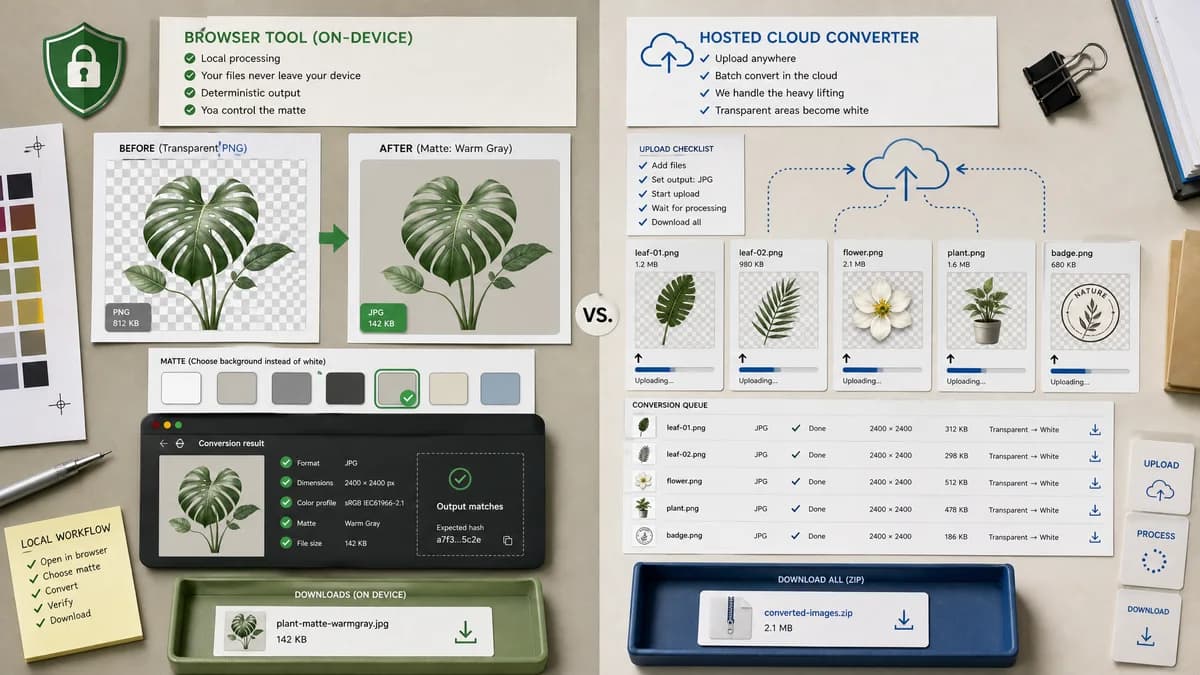
WebP to JPG Converter is the baseline in this comparison: Convert a WebP image to JPG in your browser, choose JPEG quality and matte color for transparent pixels, then confirm image/jpeg MIME, .jpg filename, dimensions, file size, and Blob status before download.
Convertio offers free WebP to JPG conversion with batch upload and a note that transparent areas are filled with a white background.
Quick verdict
TextFaker should position against Convertio with local privacy and richer validation, while learning from Convertio's clear transparency FAQ.
How WebP to JPG Converter fits
TextFaker can match the dedicated format flow while emphasizing local processing, deterministic output checks, and user-selected matte behavior instead of a fixed white fill.
How Convertio fits
Convertio is easy to use and supports batch conversion, but it is a hosted upload workflow. Its transparency answer is useful competitive evidence for making TextFaker alpha behavior explicit.
Side-by-side comparison
| Decision point | WebP to JPG Converter | Convertio | Takeaway |
|---|---|---|---|
| Privacy model | Our workflowRuns in the browser with no file upload requirement. | Competitor workflowHosted upload converter. | TextFaker should own the privacy-sensitive use case. |
| Batch support | Our workflowCan be scoped to single or multiple local files if adapter supports it. | Competitor workflowConvertio states multiple WebP images can be uploaded and converted simultaneously. | If TextFaker supports multiple files, document it; if not, win on clarity and validation. |
| Transparency | Our workflowExplicit chosen matte/background behavior. | Competitor workflowConvertio says transparent WebP areas are filled with white. | A selectable matte is a concrete differentiator. |
| Output format | Our workflowVerify image/jpeg MIME and .jpg output filename. | Competitor workflowConverts to JPG but does not frame the result as a validation checklist. | TextFaker can be more QA-oriented. |
| Quality control | Our workflowExpose a JPEG quality slider with deterministic copy. | Competitor workflowHosted conversion emphasizes ease and compatibility. | Quality control should be part of TextFaker's above-the-fold UI. |
| Compatibility message | Our workflowExplain JPEG compatibility and alpha loss in tool copy. | Competitor workflowConvertio emphasizes universally compatible JPG images. | TextFaker should pair compatibility language with local-processing proof. |
Use WebP to JPG Converter when
- No-upload WebP to JPG conversion
- Choosing a matte color for transparent WebP files
- Users who want output MIME and filename verification
Use Convertio when
- Hosted batch conversion
- Users already comfortable uploading to a conversion service
- Simple white-background transparency flattening
Detailed comparison
Positioning
Convertio is a direct SEO competitor for WebP to JPG. Its transparency FAQ creates a clear benchmark for TextFaker copy.
Privacy
TextFaker should repeatedly state that conversion happens locally, especially near upload controls and download results.
Controls
Quality and matte controls should be visible before conversion so users know how JPEG output will be generated.
Generated Image
Use a generated transparent WebP badge with soft shadow edges so white matte versus custom matte is visually obvious.
Research notes
- Official page states WebP to JPG conversion is free for normal use, with larger or frequent conversions tied to subscription plans.
- Official FAQ says JPG does not support transparency and transparent areas are filled with white.
- Official page states batch conversion is supported.
Official source
The only outbound competitor link on this page is placed here for source checking after the comparison.
Official Convertio source