
WebP to JPG Converter vs Ezgif
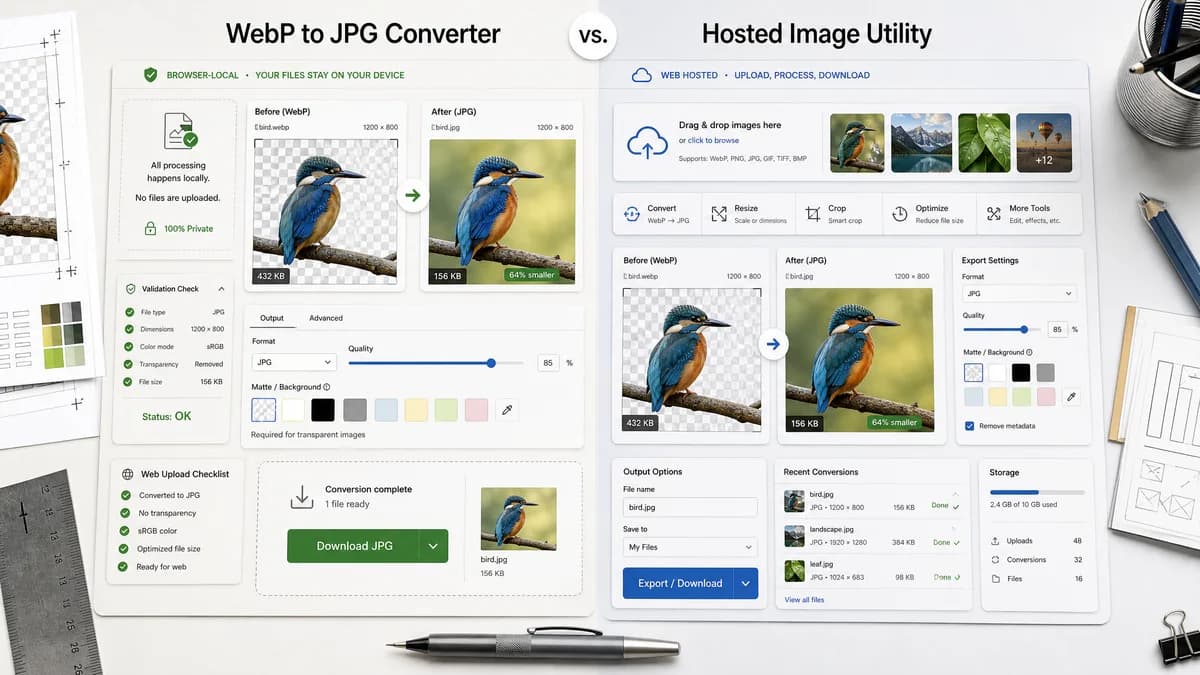
WebP to JPG Converter is the baseline in this comparison: Convert a WebP image to JPG in your browser, choose JPEG quality and matte color for transparent pixels, then confirm image/jpeg MIME, .jpg filename, dimensions, file size, and Blob status before download.
Ezgif converts WebP to JPG online and exposes quality factor plus background color for transparent images.
Quick verdict
TextFaker should match Ezgif's explicit quality/background affordances and go further on browser-local privacy and validation details.
How WebP to JPG Converter fits
TextFaker should compete closely with Ezgif on quality and matte controls while differentiating through local-only processing and formal output verification.
How Ezgif fits
Ezgif is one of the strongest functional competitors because it directly documents JPEG quality and transparent-image background controls.
Side-by-side comparison
| Decision point | WebP to JPG Converter | Ezgif | Takeaway |
|---|---|---|---|
| Quality control | Our workflowJPEG quality slider should be direct and test-covered. | Competitor workflowEzgif lets users set a JPG quality factor from 0 to 100. | TextFaker needs an equally clear slider. |
| Transparency | Our workflowChosen matte/background color for alpha flattening. | Competitor workflowEzgif lets users choose a background color for transparent images. | This is table-stakes for a strong WebP to JPG page. |
| Privacy model | Our workflowBrowser-local processing. | Competitor workflowHosted upload workflow. | Privacy is TextFaker's main differentiator. |
| Batch workflow | Our workflowIf supported, keep batch local; otherwise define scope clearly. | Competitor workflowEzgif references a bulk WebP to JPG converter. | Do not imply bulk support unless implemented. |
| Output validation | Our workflowShow image/jpeg, .jpg, dimensions, and Blob status. | Competitor workflowEzgif focuses on conversion and editing continuation. | TextFaker can be more audit-friendly. |
| Adjacent tools | Our workflowPart of a focused TextFaker image conversion family. | Competitor workflowEzgif has many related image and animation tools. | Ezgif wins breadth; TextFaker should win local clarity. |
Use WebP to JPG Converter when
- Local conversion with quality and matte controls
- QA-focused users who need Blob and MIME confirmation
- Single-purpose WebP to JPG conversion without unrelated editing steps
Use Ezgif when
- Users who want many adjacent GIF/WebP editing tools
- Hosted batch conversion
- Animated WebP conversion workflows
Detailed comparison
Feature Bar
Ezgif sets the strongest direct feature bar because it includes both JPEG quality and transparent-image background controls.
Validation
TextFaker should turn its implementation checks into visible result rows so the page feels more deterministic than a generic converter.
Scope
The dedicated page should avoid drifting into GIF editing or animation extraction. Link to adjacent tools only where useful.
Generated Image
Use generated transparent WebP UI artwork with colored matte presets to demonstrate exactly what changes when alpha is flattened.
Research notes
- Official page says no watermark and no signup.
- Official instructions mention setting JPG quality factor and choosing a background color.
- Official page references bulk conversion for many WebP files.
Official source
The only outbound competitor link on this page is placed here for source checking after the comparison.
Official Ezgif source