
WebP to JPG Converter vs iLoveIMG
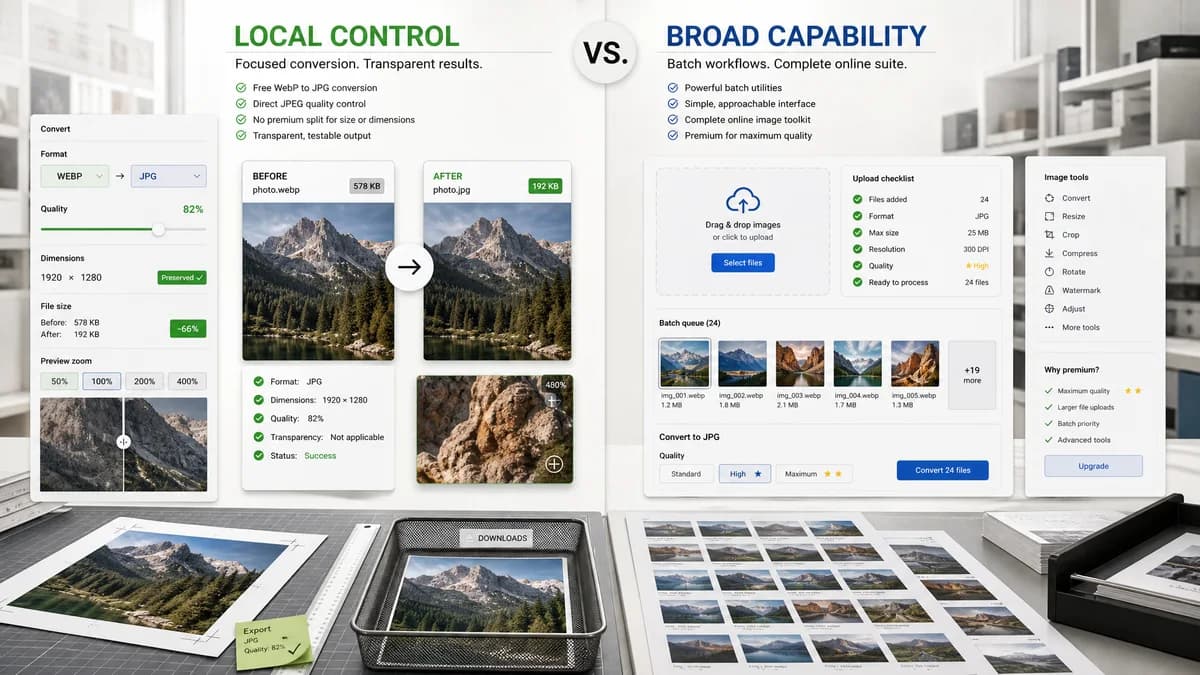
WebP to JPG Converter is the baseline in this comparison: Convert a WebP image to JPG in your browser, choose JPEG quality and matte color for transparent pixels, then confirm image/jpeg MIME, .jpg filename, dimensions, file size, and Blob status before download.
iLoveIMG converts multiple WebP images to JPG online and offers quality choices including a premium high-quality path.
Quick verdict
TextFaker should compete with clear local conversion and fully visible output checks; iLoveIMG remains better for users embedded in a hosted image-tool suite.
How WebP to JPG Converter fits
TextFaker should provide a local free path with direct JPEG quality control and no premium split for preserving dimensions.
How iLoveIMG fits
iLoveIMG is strong for batch utility workflows and simple UI. Its premium quality distinction gives TextFaker room to emphasize local, transparent, testable conversion.
Side-by-side comparison
| Decision point | WebP to JPG Converter | iLoveIMG | Takeaway |
|---|---|---|---|
| Batch conversion | Our workflowShould define whether local batch conversion is supported. | Competitor workflowiLoveIMG says it can convert multiple WebP images to JPG at once. | Batch support is an expected feature to document. |
| Quality options | Our workflowDirect JPEG quality slider for all users. | Competitor workflowRecommended Quality is available, while High Quality is marked premium. | TextFaker can make quality control more transparent. |
| Privacy | Our workflowFiles stay in the browser. | Competitor workflowHosted upload flow. | Local processing is the differentiator. |
| Output naming | Our workflowDeterministic .jpg filename from source basename. | Competitor workflowConverts all images to JPG. | TextFaker should spell out expected filenames. |
| Transparency | Our workflowExplicit matte/background flattening. | Competitor workflowNot prominent in researched page text. | Alpha behavior should be surfaced in the UI. |
| Result details | Our workflowShow MIME, dimensions, quality, Blob size, and download state. | Competitor workflowConversion UI is simpler and less verification-oriented. | TextFaker should target users who want proof. |
Use WebP to JPG Converter when
- Local single-purpose conversion
- Free visible quality slider
- Dimension and Blob verification after output
Use iLoveIMG when
- Bulk hosted conversion
- Users who already use iLoveIMG tools
- Simple convert-to-JPG tasks without detailed validation
Detailed comparison
Batch
iLoveIMG's multiple-image messaging means TextFaker should be explicit about local batch status and not bury it.
Quality
A free JPEG quality slider is a clear way to avoid premium-quality ambiguity.
Verification
Preserved dimensions should be shown after conversion so users know JPG output did not resize unexpectedly.
Generated Image
Use generated product-card WebP images to show multiple converted JPG previews if batch support is included.
Research notes
- Official page says multiple WebP files can be converted to JPG at once.
- Official page shows Recommended Quality and High Quality Premium options.
- Official page says all images will be converted to JPG.
Official source
The only outbound competitor link on this page is placed here for source checking after the comparison.
Official iLoveIMG source