
WebP to JPG Converter vs Online-Convert
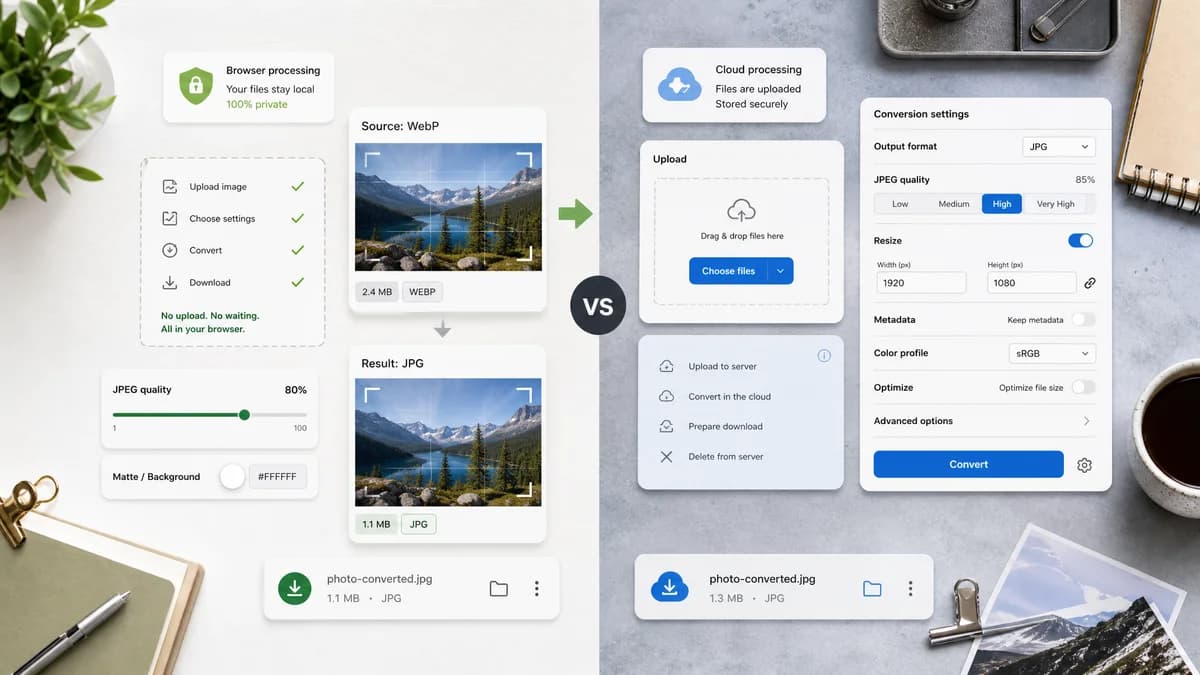
WebP to JPG Converter is the baseline in this comparison: Convert a WebP image to JPG in your browser, choose JPEG quality and matte color for transparent pixels, then confirm image/jpeg MIME, .jpg filename, dimensions, file size, and Blob status before download.
Online-Convert converts WebP to JPG with quality controls and conversion settings.
Quick verdict
TextFaker should provide the essential controls without the complexity of a full hosted settings panel.
How WebP to JPG Converter fits
TextFaker should be simpler and more private, keeping conversion in the browser while still offering the essential JPEG quality slider and matte setting.
How Online-Convert fits
Online-Convert is a capable hosted tool with visible quality choices. It competes on configurable conversion but not local processing.
Side-by-side comparison
| Decision point | WebP to JPG Converter | Online-Convert | Takeaway |
|---|---|---|---|
| Settings depth | Our workflowFocused quality and matte controls. | Competitor workflowQuality and compression options are visible on the page. | TextFaker should keep controls direct rather than broad. |
| Privacy | Our workflowBrowser-local conversion. | Competitor workflowHosted conversion service. | TextFaker should state files stay on-device. |
| Input support | Our workflowValidate WebP input specifically. | Competitor workflowGeneral file input converter for Google Web Picture files. | Dedicated validation can catch wrong-file uploads cleanly. |
| Output | Our workflowimage/jpeg Blob with .jpg filename. | Competitor workflowConverts to JPG/JFIF format. | TextFaker should present browser-level output evidence. |
| Transparency | Our workflowExplicit alpha flattening over matte. | Competitor workflowTransparency behavior is not the central message in the researched page text. | TextFaker should include an alpha warning and preview. |
| Testing | Our workflowObjective tests should cover MIME, filename, Blob, dimensions, quality, and matte. | Competitor workflowHosted UI behavior is not available for local test assertions. | TextFaker can be validated more deterministically. |
Use WebP to JPG Converter when
- Local WebP to JPG conversion
- Minimal controls focused on JPEG quality and matte
- Result verification for MIME, filename, dimensions, and Blob
Use Online-Convert when
- Users who want many hosted image settings
- One-off conversion with cloud processing
- People already using Online-Convert's file tools
Detailed comparison
Settings
Online-Convert demonstrates that quality settings are expected. TextFaker should include a quality slider but avoid overwhelming users.
Local Edge
The strongest contrast is that TextFaker can convert using browser canvas and Blob APIs without upload.
Alpha
Add matte copy near conversion controls, not only in FAQ text, because transparent WebP is common for UI assets.
Generated Image
Use generated WebP artwork with transparent icon edges and a colored background swatch to show matte preview behavior.
Research notes
- Official page identifies the input as Google Web Picture files and output as JPG/JFIF.
- Official page exposes quality choices from best quality to smaller file size.
- Official page includes a quality setting description.
Official source
The only outbound competitor link on this page is placed here for source checking after the comparison.
Official Online-Convert source