
WebP to JPG Converter vs TinyWow
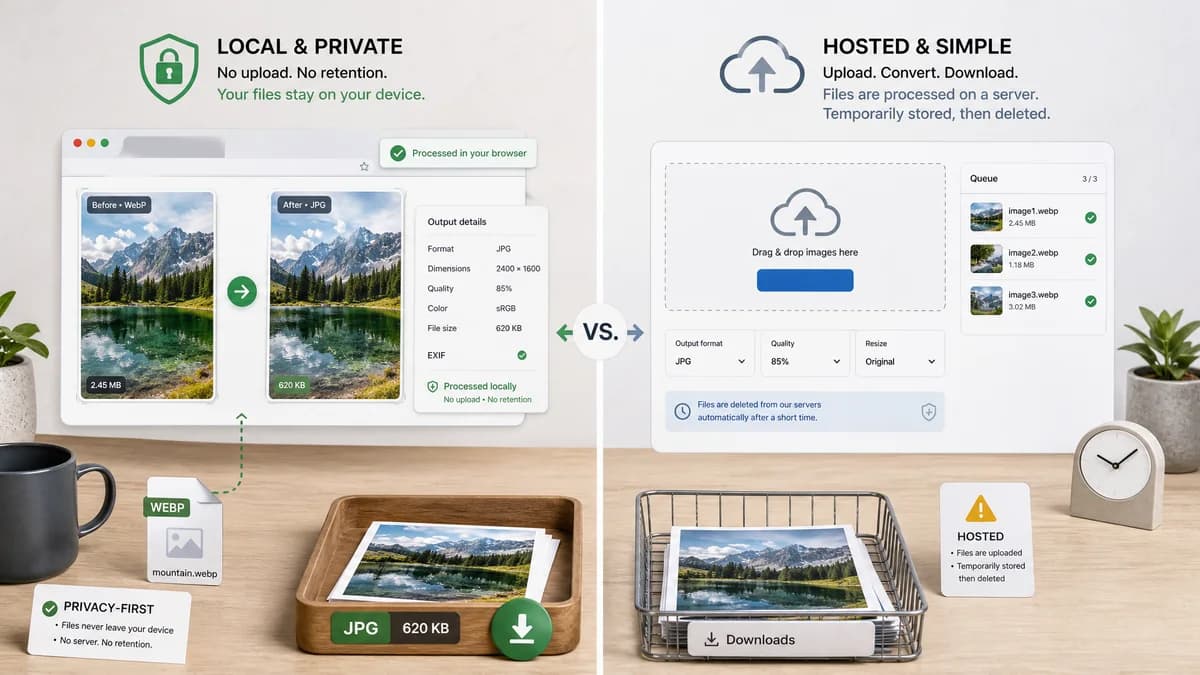
WebP to JPG Converter is the baseline in this comparison: Convert a WebP image to JPG in your browser, choose JPEG quality and matte color for transparent pixels, then confirm image/jpeg MIME, .jpg filename, dimensions, file size, and Blob status before download.
TinyWow offers a WebP to JPG page and states uploaded and generated files are deleted after a short retention window.
Quick verdict
TextFaker should position as the local alternative for users who do not want files retained on any server, even temporarily.
How WebP to JPG Converter fits
TextFaker should avoid retention-window concerns by keeping conversion local and exposing output details after conversion.
How TinyWow fits
TinyWow is a simple hosted utility with deletion messaging. It is relevant for users searching for quick conversion, but not ideal for no-upload privacy needs.
Side-by-side comparison
| Decision point | WebP to JPG Converter | TinyWow | Takeaway |
|---|---|---|---|
| Retention | Our workflowNo server retention because files should remain local. | Competitor workflowTinyWow states uploaded and generated files are deleted after one hour in the researched page text. | TextFaker can make a stronger privacy claim. |
| Output proof | Our workflowimage/jpeg MIME, .jpg filename, dimensions, and Blob status. | Competitor workflowDownload-oriented conversion flow. | TextFaker should be more transparent. |
| Quality | Our workflowJPEG quality slider. | Competitor workflowQuality controls are not prominent in the researched snippet. | Quality control should be a TextFaker advantage. |
| Transparency | Our workflowExplicit matte/background for alpha flattening. | Competitor workflowTransparency behavior is not prominent in researched page text. | TextFaker should cover transparent WebP clearly. |
| Scope | Our workflowDedicated WebP to JPG only. | Competitor workflowPart of a broad online tool collection. | TextFaker can be more exact for this query. |
| Testing | Our workflowAdapter tests should assert Blob and JPEG output behavior. | Competitor workflowHosted UI cannot be part of TextFaker local tests. | Objective validation belongs in TextFaker's implementation. |
Use WebP to JPG Converter when
- No-upload conversion
- Private WebP files
- Technical validation of final JPG output
Use TinyWow when
- Simple hosted conversion
- Users comfortable with temporary cloud processing
- People already using TinyWow utilities
Detailed comparison
Privacy
TinyWow's deletion-window messaging is common among hosted tools. TextFaker should use local processing to avoid that tradeoff.
Controls
Add only controls that matter for JPEG output: quality and matte color.
Results
Make download text deterministic for testing and accessibility, such as Download JPG and Copy result details.
Generated Image
Use generated private-document style WebP art with redacted details to reinforce local conversion positioning.
Research notes
- Official search result text says uploaded and generated files are deleted after one hour.
- TinyWow is a hosted converter and broad online utility site.
- Use only official URL in competitorUrl; avoid embedding outbound links in body copy.
Official source
The only outbound competitor link on this page is placed here for source checking after the comparison.
Official TinyWow source