
WebP to JPG Converter vs Zamzar
WebP to JPG Converter is the baseline in this comparison: Convert a WebP image to JPG in your browser, choose JPEG quality and matte color for transparent pixels, then confirm image/jpeg MIME, .jpg filename, dimensions, file size, and Blob status before download.
Zamzar is a long-running hosted file converter that converts WebP files to JPG through an upload, convert, and download flow.
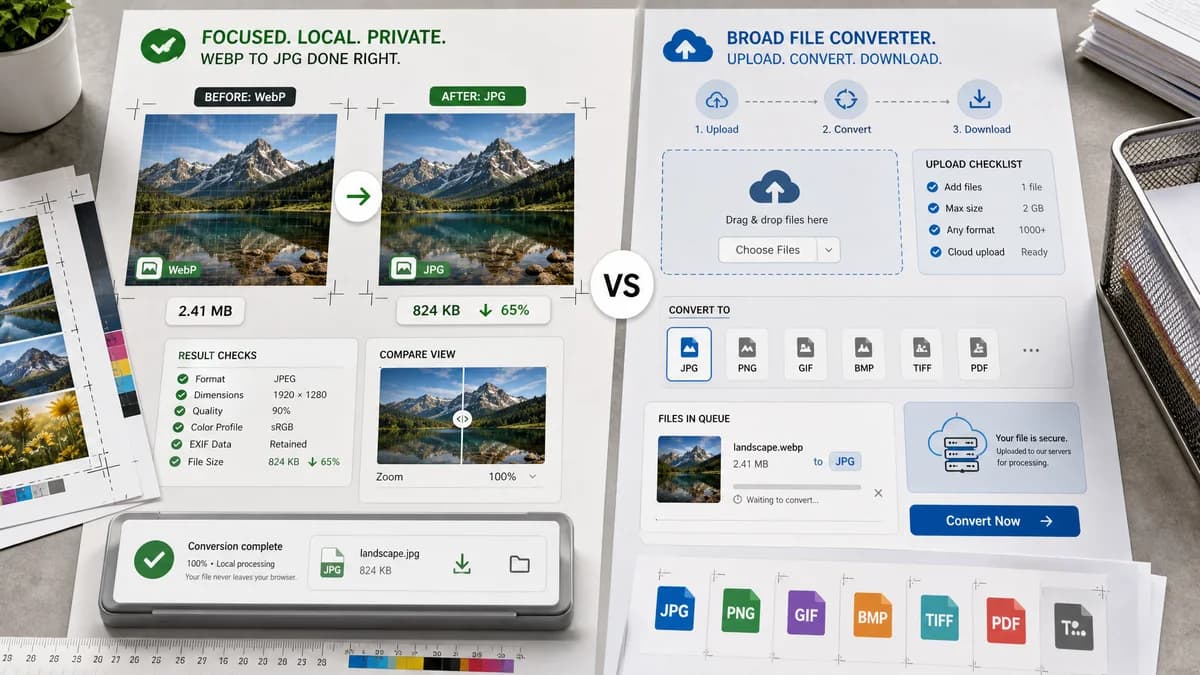
Quick verdict
TextFaker should win the focused local converter use case; Zamzar remains a broad conversion fallback for users who accept hosted processing.
How WebP to JPG Converter fits
TextFaker should provide a more transparent local workflow with no email/account angle and objective result checks for the converted JPEG.
How Zamzar fits
Zamzar is useful for users who need a general file conversion service and cloud-source options. Its core flow is less specialized than a dedicated browser-local WebP to JPG page.
Side-by-side comparison
| Decision point | WebP to JPG Converter | Zamzar | Takeaway |
|---|---|---|---|
| Conversion flow | Our workflowSelect local WebP, convert in browser, download JPG. | Competitor workflowUpload WebP, choose JPEG, convert, download. | TextFaker should reduce trust and waiting concerns. |
| Format focus | Our workflowOnly WebP to JPG/JPEG for the dedicated page. | Competitor workflowZamzar supports many file conversion categories. | A narrow page can answer intent more precisely. |
| Output details | Our workflowExpose MIME, extension, dimensions, Blob size, and quality setting. | Competitor workflowDownload result after conversion. | TextFaker's result panel should be stronger for QA. |
| Transparency | Our workflowExplicit matte for transparent WebP input. | Competitor workflowTransparency handling is not prominent in the official page text. | Alpha behavior should be a differentiator. |
| Quality slider | Our workflowVisible JPEG quality slider. | Competitor workflowMain page emphasizes upload and conversion rather than detailed JPEG controls. | TextFaker can give more immediate control. |
| Copy/download text | Our workflowDeterministic labels such as Copy result details and Download JPG. | Competitor workflowDownload-oriented hosted flow. | TextFaker should use predictable action wording for tests and UX. |
Use WebP to JPG Converter when
- No-upload conversion from WebP to JPG
- Direct download with predictable .jpg naming
- Users checking dimensions and MIME before sharing
Use Zamzar when
- General file conversion across many categories
- Cloud storage or URL import flows
- Users who want an established hosted converter
Detailed comparison
Intent
Zamzar targets broad conversion intent. TextFaker should target users who already know they need a WebP changed into a JPG.
Trust
Local processing avoids explaining retention, deletion, and account concerns.
Output
Make the .jpg filename and image/jpeg MIME visible so users can confirm they did not receive a renamed WebP.
Generated Image
Use a generated ecommerce product WebP fixture to show practical conversion for marketplaces that prefer JPG.
Research notes
- Official page describes uploading WebP, selecting JPEG, converting, and downloading.
- Official site positions Zamzar as a broad file conversion service.
- Official page references other software options such as Photoshop and Windows tools as alternatives.
Official source
The only outbound competitor link on this page is placed here for source checking after the comparison.
Official Zamzar source