
Open Source Alternatives to CloudConvert
WebP to JPG Converter is a browser-based alternative for users who need this focused result without installing a proprietary desktop app or entering a larger hosted workflow.
This research compares that workflow with CloudConvert while keeping the outbound source link at the bottom after the analysis.
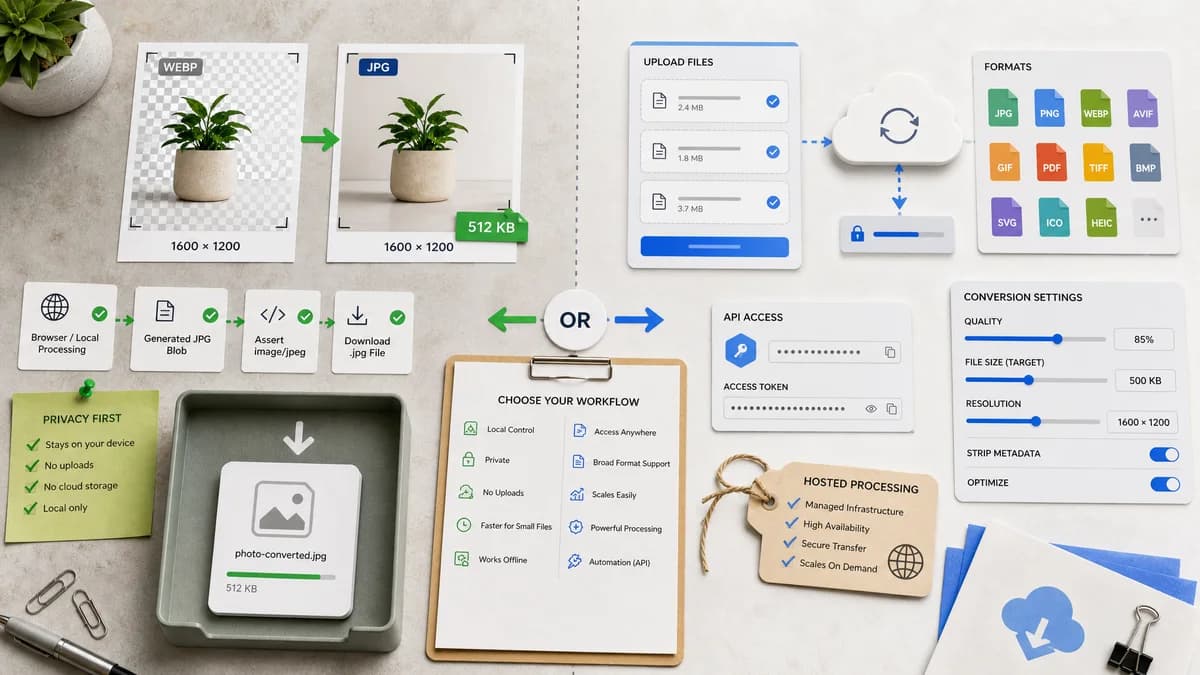
Why WebP to JPG Converter fits
TextFaker can convert a WebP into a generated JPG Blob in the browser, assert image/jpeg output, keep dimensions stable, apply a visible matte for transparent pixels, and download a .jpg file without uploading the image.
What CloudConvert offers
CloudConvert provides hosted file conversion with a broad format catalog, API access, and controls such as quality, file size, and resolution.
Open alternative signals
Processing location
WebP to JPG ConverterBrowser-local for decoded WebP and generated JPG output
CloudConvertHosted upload and server-side conversion
Output evidence
WebP to JPG ConverterShows MIME, extension, dimensions, Blob status, and matte choice
CloudConvertFocuses on download result and cloud conversion settings
Automation
WebP to JPG ConverterManual browser tool
CloudConvertAPI and platform workflow available
Generated images
WebP to JPG ConverterGenerates a downloadable JPG preview from the local canvas pipeline
CloudConvertGenerates converted files through hosted infrastructure
Decision guide
Private, one-off WebP to JPG/JPEG conversion where local processing, deterministic output checks, and transparent matte behavior matter more than cloud automation.
API-driven or multi-format conversion pipelines that need hosted processing, integrations, or large-format coverage beyond this dedicated browser tool.
Side-by-side open source alternative comparison
| Decision point | WebP to JPG Converter | CloudConvert | Takeaway |
|---|---|---|---|
| Privacy model | Our workflowNo upload required for the conversion path | Proprietary workflowFiles are selected and sent to a hosted service | TextFaker has the stronger default story for sensitive images. |
| Format scope | Our workflowSingle WebP to JPG/JPEG task | Proprietary workflowBroad file conversion platform | CloudConvert is broader; TextFaker can be more explicit and focused. |
| Transparency handling | Our workflowRequires an explicit matte/background because JPEG has no alpha | Proprietary workflowGeneral conversion options may not make alpha flattening the main workflow | Make transparency behavior a visible SEO and UX differentiator. |
| Quality control | Our workflowJPEG quality slider maps to browser image/jpeg export | Proprietary workflowHosted quality and file-size controls | Both can expose quality; TextFaker should verify output Blob and dimensions. |
| Developer fit | Our workflowBest for browser-local manual conversion | Proprietary workflowBest for API and batch automation | The page should separate private local use from cloud workflow needs. |
| Generated preview | Our workflowCan display the generated JPG before download | Proprietary workflowPrimarily conversion/download flow | Preview plus output assertions can improve user trust. |
Detailed research
Why users compare them
CloudConvert ranks as a familiar general-purpose converter, so users searching for alternatives often want the same WebP to JPG outcome with fewer cloud workflow assumptions.
- Emphasize local conversion for privacy-sensitive images.
- Show image/jpeg, .jpg, dimensions, and Blob checks after conversion.
- Explain that WebP transparency must be flattened for JPEG.
SEO page angle
The page should target users who only need WebP to JPG conversion, not a universal file converter. The copy should describe an open-source-powered browser workflow without claiming TextFaker itself is open source.
Validation checklist
Automated tests should load a WebP fixture, export JPEG at multiple quality settings, verify the filename extension, and compare output dimensions against input dimensions.
- Transparent WebP fixture should produce expected matte pixels.
- Quality slider should alter generated JPEG size or encoding output.
- Download and copy labels should remain deterministic.
Generated image behavior
The generated JPG preview should be treated as the canonical result shown to the user before download, not just as a hidden file side effect.
- Expose output MIME.
- Expose generated Blob size.
- Expose selected matte color.
Research notes
- CloudConvert's official page positions the product as an online converter supporting PNG, JPG, GIF, WebP, HEIC, and conversion options.
- This comparison should avoid implying CloudConvert is open source; it is proprietary software and a hosted service.
- Generated image validation should emphasize image/jpeg Blob output and .jpg filename checks.
Official source
The proprietary product link is included once here for source checking after the alternative analysis.
Official CloudConvert source