
Open Source Alternatives to Convertio
WebP to JPG Converter is a browser-based alternative for users who need this focused result without installing a proprietary desktop app or entering a larger hosted workflow.
This research compares that workflow with Convertio while keeping the outbound source link at the bottom after the analysis.
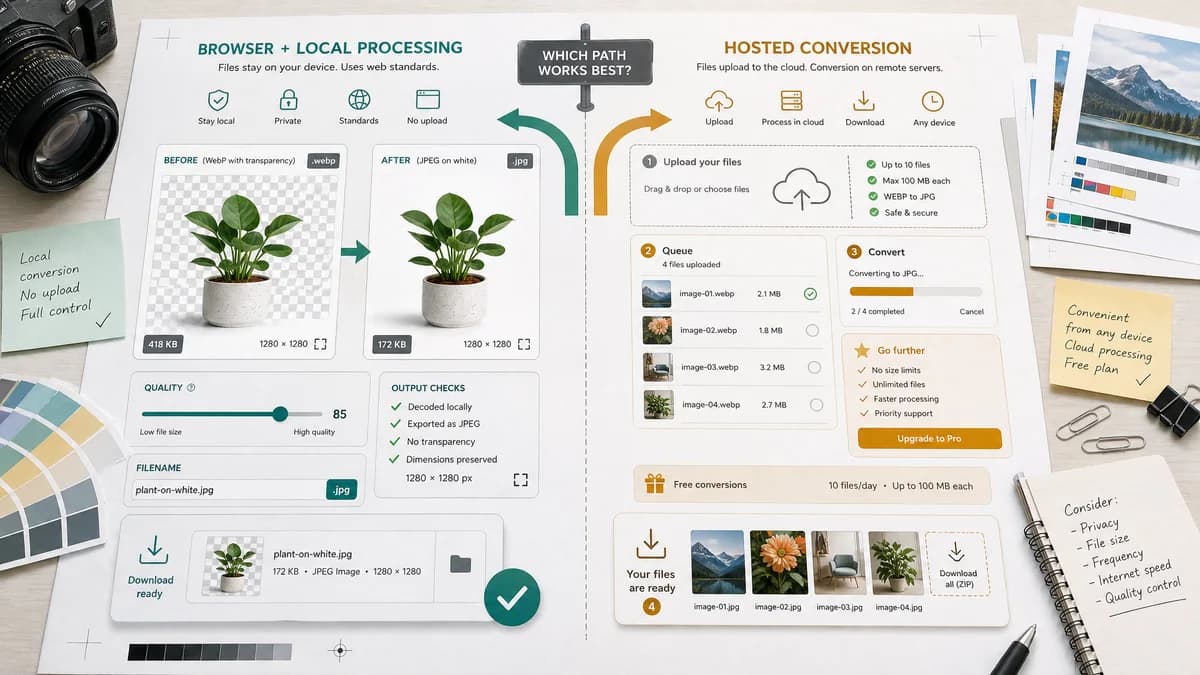
Why WebP to JPG Converter fits
TextFaker should offer local WebP decoding and JPEG export with visible output assertions, quality control, .jpg naming, preserved dimensions, and clear handling of transparent WebP backgrounds.
What Convertio offers
Convertio offers browser-based access to hosted conversion with free WebP to JPG conversion, batch upload, and subscription options for larger or frequent conversions.
Open alternative signals
Alpha behavior
WebP to JPG ConverterExplicit matte/background control for transparent WebP
ConvertioTransparent areas are filled with white according to the official page
File location
WebP to JPG ConverterImage stays in the browser for conversion
ConvertioUpload-based conversion flow
Limits
WebP to JPG ConverterConstrained mainly by browser memory and canvas support
ConvertioFree tier and subscription model for larger or frequent work
Generated images
WebP to JPG ConverterGenerates local JPG Blob and preview
ConvertioGenerates hosted converted JPG downloads
Decision guide
Users who want a quick local conversion and clear evidence that the result is image/jpeg without sending the WebP to a service.
Users who need batch hosted conversion, cloud storage sources, or broader file-type conversion beyond WebP to JPG.
Side-by-side open source alternative comparison
| Decision point | WebP to JPG Converter | Convertio | Takeaway |
|---|---|---|---|
| Transparency | Our workflowChosen matte is part of the workflow | Proprietary workflowWhite background behavior is documented | TextFaker can give users more control over JPEG flattening. |
| Output checks | Our workflowCan assert image/jpeg, .jpg, dimensions, and Blob | Proprietary workflowDownload-oriented result | TextFaker should lead with verifiable conversion details. |
| Batch conversion | Our workflowFuture scope can remain focused unless local multi-file support is added | Proprietary workflowBatch conversion is advertised | Convertio may fit batch users better. |
| Account pressure | Our workflowNo account needed for local single-file conversion | Proprietary workflowSubscription applies for larger or frequent conversions | TextFaker can be simpler for everyday tasks. |
| Source positioning | Our workflowOpen-source-powered browser APIs and standards | Proprietary workflowClosed hosted service | Use precise wording and avoid unsupported open-source claims. |
| Generated preview | Our workflowPreview can reveal matte result before download | Proprietary workflowConversion result is primarily downloaded | Preview is important for transparent logos and UI assets. |
Detailed research
Why users compare them
Convertio is a common search result for format conversion, but privacy-minded users may prefer a local path for small image conversions.
- Call out no upload for the TextFaker workflow.
- Mention white matte only as one available option, not a hidden default.
- Keep the target conversion limited to WebP to JPG/JPEG.
Implementation note
Use the shared image format converter with a dedicated adapter that accepts WebP and locks output to JPEG.
- Set output MIME to image/jpeg.
- Use .jpg as the generated filename extension.
- Pass the slider value to JPEG quality export.
Test focus
Add fixture coverage for opaque and transparent WebP inputs so the page's transparency claims are objective.
- Verify preserved width and height.
- Verify generated Blob type.
- Verify matte pixel behavior.
Generated image behavior
The generated image preview should be copy- and download-ready after conversion.
- Stable button text supports deterministic UI tests.
- The preview should not imply alpha remains in JPEG.
Research notes
- Convertio's official page states that JPG does not preserve transparency and transparent WebP areas are filled with white.
- Convertio is proprietary software, so the page should frame TextFaker as browser-based and open-source-powered instead of claiming source availability.
- A white default matte can be offered, but TextFaker should let users choose and disclose the matte color.
Official source
The proprietary product link is included once here for source checking after the alternative analysis.
Official Convertio source