
Open Source Alternatives to iLoveIMG
WebP to JPG Converter is a browser-based alternative for users who need this focused result without installing a proprietary desktop app or entering a larger hosted workflow.
This research compares that workflow with iLoveIMG while keeping the outbound source link at the bottom after the analysis.
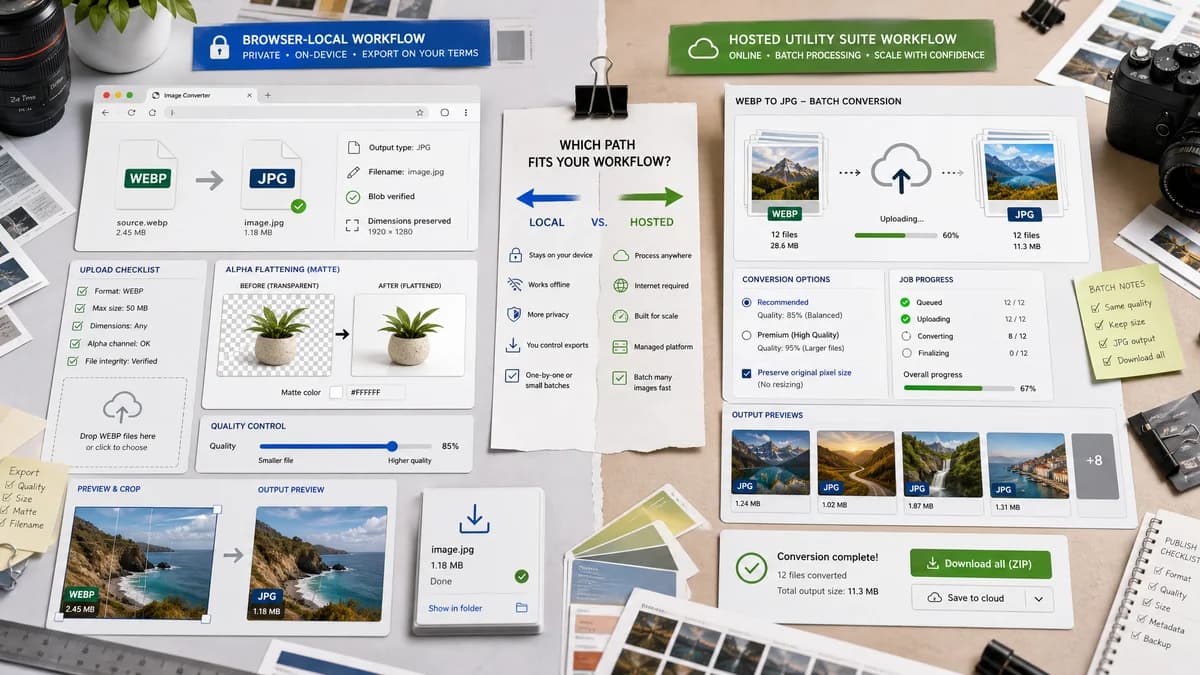
Why WebP to JPG Converter fits
TextFaker should offer local WebP to JPEG conversion with fixed output type, .jpg filename generation, Blob verification, preserved dimensions, quality control, and explicit matte flattening for alpha.
What iLoveIMG offers
iLoveIMG converts multiple WebP images to JPG online and offers recommended quality plus a premium high quality option that keeps original size in pixels.
Open alternative signals
Batch conversion
WebP to JPG ConverterDedicated local converter; batch only if implemented
iLoveIMGMultiple WebP images to JPG are supported
Quality tiers
WebP to JPG ConverterDirect JPEG quality slider
iLoveIMGRecommended quality and premium high quality options
Output facts
WebP to JPG ConverterMIME, extension, dimensions, Blob, matte
iLoveIMGConversion option labels and download result
Generated images
WebP to JPG ConverterLocal generated JPG result
iLoveIMGHosted generated JPG conversion
Decision guide
Users who need a private, no-upload WebP to JPG conversion for one image with technical result details.
Users who want multiple online image utilities, batch conversion, cloud-style workflows, or premium quality options inside a hosted image suite.
Side-by-side open source alternative comparison
| Decision point | WebP to JPG Converter | iLoveIMG | Takeaway |
|---|---|---|---|
| Pricing surface | Our workflowDedicated local tool with visible controls | Proprietary workflowPremium high quality option appears in the converter UI | TextFaker can avoid tier ambiguity for simple conversion. |
| Batch | Our workflowSingle-purpose local workflow unless expanded | Proprietary workflowMultiple image conversion | iLoveIMG is stronger for batch jobs. |
| Privacy | Our workflowNo upload in intended path | Proprietary workflowHosted upload flow | TextFaker should highlight local processing. |
| Dimension handling | Our workflowPreserved dimensions should be validated and shown | Proprietary workflowHigh quality option mentions keeping original pixel size | Objective dimension checks are stronger than labels. |
| Transparency | Our workflowMatte/background flattening is explicit | Proprietary workflowOfficial page focuses on JPG conversion and quality options | TextFaker should make alpha behavior impossible to miss. |
| Generated preview | Our workflowPreview and generated Blob details | Proprietary workflowDownload after online processing | TextFaker can help users inspect before saving. |
Detailed research
Why users compare them
iLoveIMG is a popular hosted image utility brand, while TextFaker can provide a leaner local route for users who only need WebP to JPG.
- Lead with browser-local conversion.
- Avoid broad utility-suite claims.
- Use objective output checks.
SEO page angle
The alternative page should compare quality and batch tradeoffs without implying TextFaker replaces the entire image suite.
Implementation note
Preserved dimensions should be calculated from decoded image metadata or canvas dimensions and displayed after export.
- Input WebP dimensions.
- Output JPG dimensions.
- Generated Blob size.
Generated image behavior
The generated JPG should be the downloadable artifact and the displayed preview source.
- Show matte color when alpha was detected or flattening was applied.
- Show quality setting used.
Research notes
- iLoveIMG's official page states that multiple WebP images can be converted to JPG at once and shows recommended and premium high quality options.
- iLoveIMG is proprietary software and should be described as a hosted image utility suite.
- TextFaker should validate preserved dimensions instead of relying on a quality label.
Official source
The proprietary product link is included once here for source checking after the alternative analysis.
Official iLoveIMG source