
Open Source Alternatives to Online-Convert
WebP to JPG Converter is a browser-based alternative for users who need this focused result without installing a proprietary desktop app or entering a larger hosted workflow.
This research compares that workflow with Online-Convert while keeping the outbound source link at the bottom after the analysis.
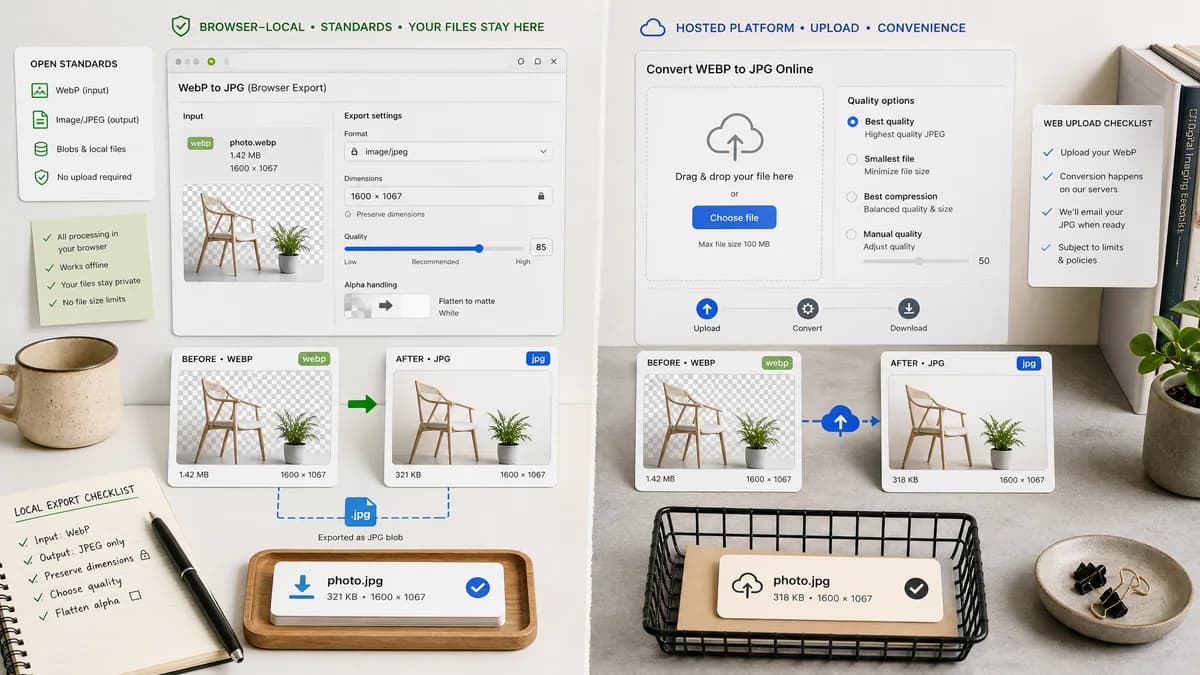
Why WebP to JPG Converter fits
TextFaker's dedicated converter should accept WebP, lock output to image/jpeg, produce a .jpg Blob, preserve dimensions, offer a JPEG quality slider, and flatten alpha with an explicit matte.
What Online-Convert offers
Online-Convert provides a hosted WebP to JPG converter with quality choices including best quality, smallest file, best compression, and manual quality settings.
Open alternative signals
Quality controls
WebP to JPG ConverterJPEG slider with output Blob feedback
Online-ConvertPreset and manual quality controls
Conversion scope
WebP to JPG ConverterDedicated WebP to JPG/JPEG
Online-ConvertBroad hosted image converter platform
Local evidence
WebP to JPG ConverterMIME, extension, dimensions, Blob, matte
Online-ConvertHosted conversion settings and download
Generated images
WebP to JPG ConverterGenerated locally through browser canvas APIs
Online-ConvertGenerated through hosted conversion infrastructure
Decision guide
Users who want a local, auditable WebP to JPG conversion with no upload and a compact set of JPEG-specific options.
Users who need a hosted converter with many file sources, broad format support, or preset-driven conversion settings.
Side-by-side open source alternative comparison
| Decision point | WebP to JPG Converter | Online-Convert | Takeaway |
|---|---|---|---|
| Control design | Our workflowOne direct JPEG quality slider | Proprietary workflowMultiple quality presets plus quality field | TextFaker can be simpler for nontechnical users. |
| Privacy | Our workflowLocal file stays in browser | Proprietary workflowHosted upload workflow | TextFaker's privacy copy should be prominent. |
| Output verification | Our workflowExplicit output checks in result UI | Proprietary workflowImplicit conversion result | Verification is a strong differentiator. |
| Format breadth | Our workflowOnly WebP to JPG/JPEG | Proprietary workflowMany image conversions | Online-Convert is broader; TextFaker is more focused. |
| Transparency | Our workflowExplicit matte required because JPEG has no alpha | Proprietary workflowQuality-focused converter UI | Alpha flattening deserves its own section. |
| Generated preview | Our workflowPreview supports immediate visual QA | Proprietary workflowDownload after conversion | TextFaker should make generated image review part of the workflow. |
Detailed research
Why users compare them
Online-Convert is a broad hosted converter. A TextFaker alternative page should make the case for a smaller local tool when only a WebP-to-JPG result is needed.
- Avoid broad file-converter claims.
- Use WebP, JPG, JPEG, image/jpeg, and .jpg consistently.
- Show quality and matte settings together.
Content angle
The page can explain that JPEG is compatible but lossy and opaque, so users should choose quality and background intentionally.
Validation
The tool should generate a Blob and then verify the result rather than only changing a filename.
- Check Blob type.
- Check extension.
- Check dimensions.
Generated image behavior
Generated image previews should help users understand the visual impact of JPEG quality presets before saving.
- Preview compression artifacts at lower quality.
- Preview flattened transparency.
Research notes
- Online-Convert's official page describes WebP to JPG conversion and output quality controls.
- Online-Convert is proprietary software; TextFaker should be called browser-based or open-source-powered, not open source unless proven.
- Preset names from competitors should not be copied; TextFaker can use a direct quality slider and output-size feedback.
Official source
The proprietary product link is included once here for source checking after the alternative analysis.
Official Online-Convert source