
Open Source Alternatives to Pixelied
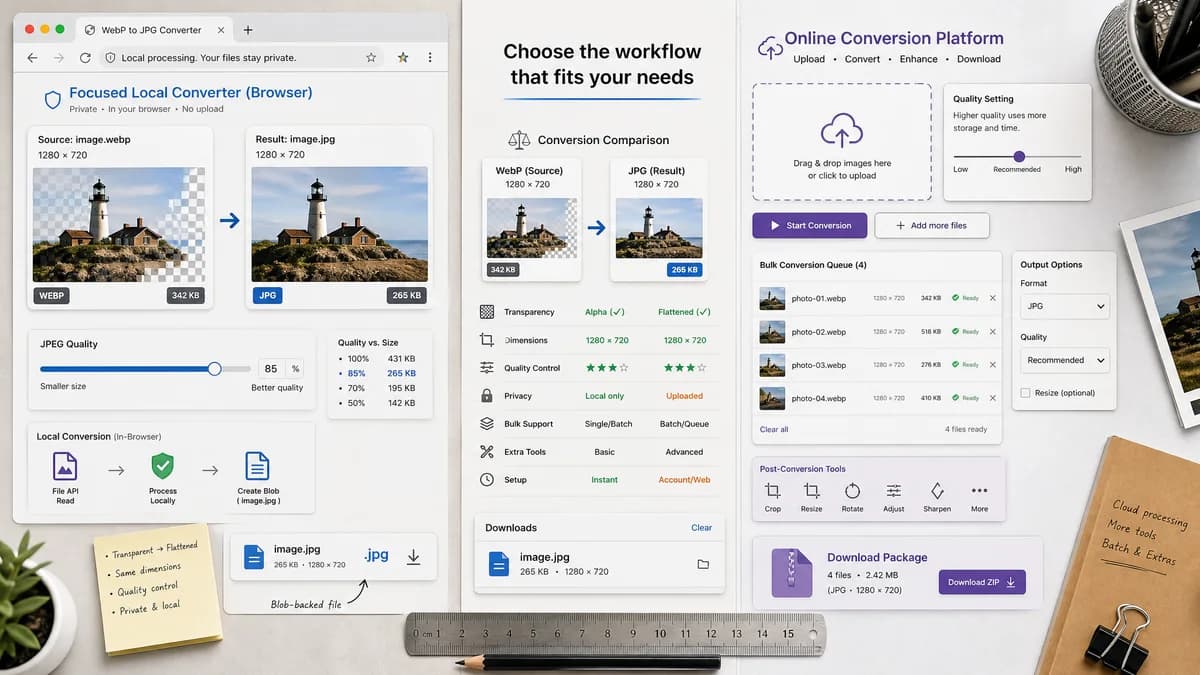
WebP to JPG Converter is a browser-based alternative for users who need this focused result without installing a proprietary desktop app or entering a larger hosted workflow.
This research compares that workflow with Pixelied while keeping the outbound source link at the bottom after the analysis.
Why WebP to JPG Converter fits
TextFaker should convert WebP to JPG locally, expose JPEG quality behavior, generate a Blob-backed .jpg file, preserve dimensions, and make alpha matte behavior visible.
What Pixelied offers
Pixelied offers a WebP to JPG converter with drag-and-drop upload, start conversion, quality setting guidance, bulk conversion, ZIP download, and access to editing tools after conversion.
Open alternative signals
Bulk output
WebP to JPG ConverterFocused generated JPG download
PixeliedBulk conversion and ZIP download are advertised
Quality language
WebP to JPG ConverterJPEG quality slider with objective output size feedback
PixeliedFAQ suggests setting quality to 100 for minimal compression
Editing
WebP to JPG ConverterNo editor required
PixeliedPhoto editing toolkit after conversion
Generated images
WebP to JPG ConverterGenerated locally by browser canvas
PixeliedGenerated by Pixelied's online conversion flow
Decision guide
A single-image, privacy-first conversion with deterministic output assertions and no design-tool dependency.
Bulk conversion and users who want conversion followed by edits in Pixelied's photo editing toolkit.
Side-by-side open source alternative comparison
| Decision point | WebP to JPG Converter | Pixelied | Takeaway |
|---|---|---|---|
| Batch conversion | Our workflowSingle-focused unless local batch is added | Proprietary workflowBulk conversion and ZIP download | Pixelied is stronger for many files. |
| Privacy | Our workflowBrowser-local path | Proprietary workflowUpload-based online workflow | TextFaker is better for private one-offs. |
| Quality claims | Our workflowShould describe quality as lossy JPEG encoding | Proprietary workflowQuality 100 guidance is prominent | TextFaker should be technically precise. |
| Editing scope | Our workflowConverter only | Proprietary workflowConverter plus editor | Pixelied fits creative edits. |
| Transparency | Our workflowExplicit matte/background control | Proprietary workflowNot the main official FAQ focus | TextFaker should own alpha-to-matte clarity. |
| Generated preview | Our workflowPreview plus Blob and dimension facts | Proprietary workflowDownload converted files after processing | TextFaker can provide stronger technical confidence. |
Detailed research
Why users compare them
Pixelied addresses both conversion and editing, while TextFaker can serve users who want a smaller private utility with less workflow overhead.
- Focus on local conversion and output verification.
- Do not claim JPEG is lossless.
- Make transparency flattening visible.
SEO page angle
The alternative page can target Pixelied users who only need WebP to JPG and not batch ZIP export or post-conversion editing.
Implementation note
Quality slider copy should explain that lower values reduce size and may add artifacts, while higher values usually increase output size.
- Use deterministic slider defaults.
- Show generated file size.
- Keep .jpg naming consistent.
Generated image behavior
The generated image should be visible and downloadable without a separate editing step.
- Generated preview should update when quality or matte changes.
- Result text should be stable for tests.
Research notes
- Pixelied's official FAQ describes setting image quality to 100, bulk conversion, ZIP download, and post-conversion editing tools.
- Pixelied is proprietary software and should be compared as a commercial online image tool.
- TextFaker should avoid claims like lossless JPG conversion; JPEG export is lossy even at high quality.
Official source
The proprietary product link is included once here for source checking after the alternative analysis.
Official Pixelied source