
WebP to PNG Converter vs CloudConvert
WebP to PNG Converter is the baseline in this comparison: Convert WebP images to PNG locally with image/png output checks, .png filenames, preserved dimensions, Blob validation, and alpha-preserving transparency handling.
Compare a focused browser-local WebP to PNG converter with a broad hosted conversion platform and API.
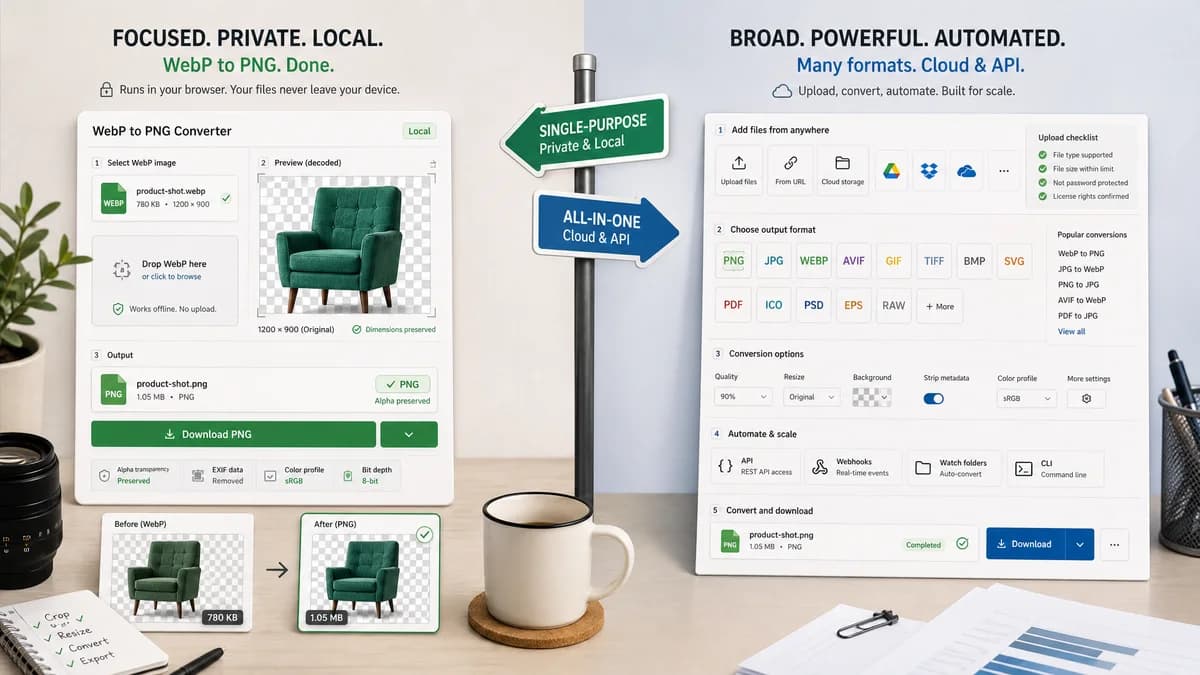
Quick verdict
Use TextFaker for a private, single-purpose WebP to PNG conversion with visible output checks. Use CloudConvert when broad format coverage, cloud file sources, or API-based conversion matters more than keeping the file local.
How WebP to PNG Converter fits
TextFaker should be a dedicated browser-local WebP to PNG page that accepts WebP input, renders the decoded image to PNG, verifies image/png output, preserves dimensions, creates a downloadable Blob, and keeps alpha transparency instead of flattening it.
How CloudConvert fits
CloudConvert is a mature hosted converter that supports many file formats and exposes image conversion options. It is stronger for broad cloud conversion and API automation than for a single no-upload browser-local WebP to PNG workflow.
Side-by-side comparison
| Decision point | WebP to PNG Converter | CloudConvert | Takeaway |
|---|---|---|---|
| Privacy model | Our workflowRuns in the browser and should keep selected WebP bytes on the device. | Competitor workflowUses a hosted upload-based conversion workflow. | TextFaker can win when the image should not leave the user's machine. |
| Conversion scope | Our workflowDedicated WebP to PNG conversion only. | Competitor workflowBroad converter covering many file categories and formats. | CloudConvert is broader; TextFaker should be simpler for this exact task. |
| Output validation | Our workflowShould show image/png MIME, .png filename, preserved dimensions, and generated Blob status. | Competitor workflowOffers conversion output and settings but does not foreground the same validation checklist. | Validation is a differentiator for developers and QA users. |
| Transparency handling | Our workflowShould preserve WebP alpha in PNG output without JPEG-style matte flattening. | Competitor workflowPNG output can support transparency, but the page is more focused on general conversion options. | TextFaker should make alpha preservation a tested promise. |
| Automation | Our workflowNo API surface; direct browser tool for manual conversion. | Competitor workflowCloudConvert is also positioned around API and automated conversion workflows. | CloudConvert fits integrations; TextFaker fits immediate local use. |
| Image options | Our workflowShould avoid unnecessary knobs unless they support WebP-to-PNG correctness. | Competitor workflowMentions options such as resolution, quality, and file size. | CloudConvert is better for configurable hosted conversion; TextFaker should emphasize deterministic output. |
Use WebP to PNG Converter when
- Private WebP to PNG conversion without uploading the image
- Users who need visible image/png, .png filename, dimension, and Blob checks
- Transparent WebP files where PNG alpha preservation must be explicit
Use CloudConvert when
- Teams converting many different file types
- Workflows that need cloud storage imports or conversion APIs
- Users who want one platform for document, video, audio, and image conversion
Detailed comparison
Quick verdict
CloudConvert is the stronger broad conversion service. TextFaker should not compete on the number of supported formats; it should compete on local privacy and a verifiable WebP to PNG contract.
Implementation angle
This tool should reuse the shared image format converter library and the dedicated adapter pattern used by the existing one-format pages. The adapter should constrain input to WebP and output to PNG.
- Accept image/webp and .webp files.
- Emit image/png with a .png download name.
- Preserve decoded width and height.
Transparency edge case
The most important distinction from WebP to JPG is alpha preservation. Transparent WebP pixels should remain transparent in the PNG output, with no matte color control because no flattening should happen.
Generated detail image
Use a 16:9 generated image showing a WebP file card becoming a PNG file card over a checkerboard transparency preview, with a small validation panel for MIME, extension, dimensions, and alpha.
Research notes
- CloudConvert's official WebP to PNG page describes hosted image conversion and broad image format support.
- The page mentions options for resolution, quality, and file size, which makes it a broader conversion competitor.
- The comparison should treat CloudConvert as hosted and API-oriented, not as a browser-local utility.
Official source
The only outbound competitor link on this page is placed here for source checking after the comparison.
Official CloudConvert source