
WebP to PNG Converter vs FreeConvert
WebP to PNG Converter is the baseline in this comparison: Convert WebP images to PNG locally with image/png output checks, .png filenames, preserved dimensions, Blob validation, and alpha-preserving transparency handling.
Compare TextFaker's local WebP to PNG converter with FreeConvert's hosted converter and batch-oriented flow.
Quick verdict
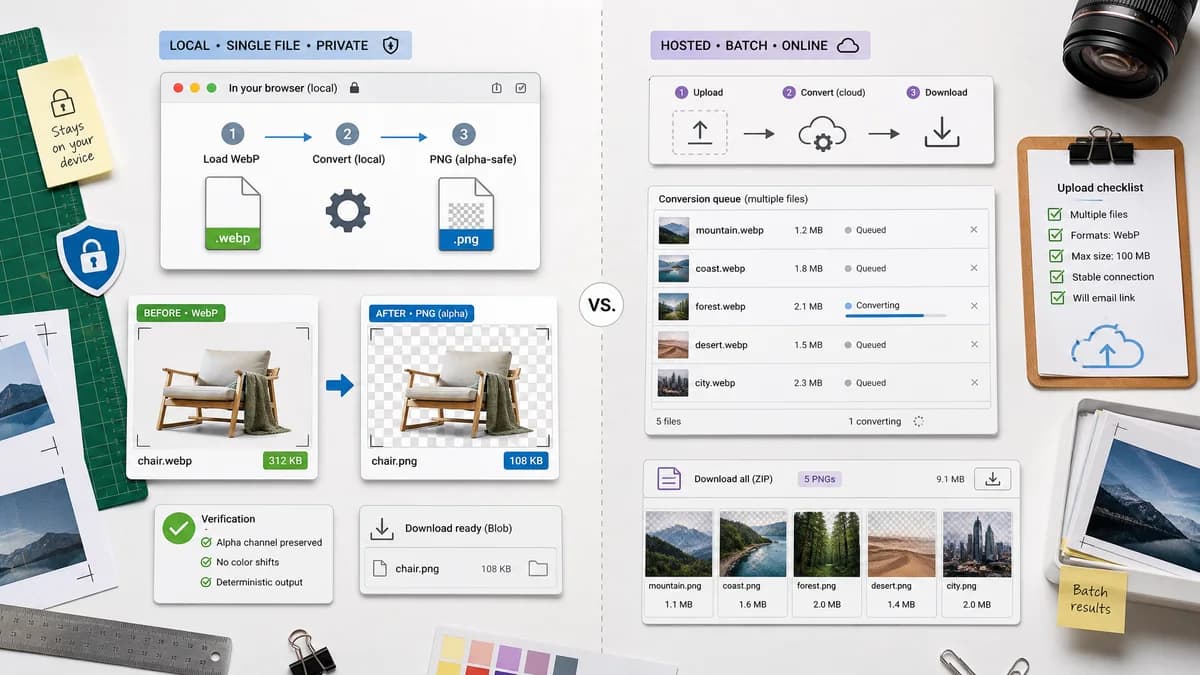
Use TextFaker when privacy and deterministic browser-local validation matter. Use FreeConvert when hosted batch conversion is acceptable and multiple files need to move through one online queue.
How WebP to PNG Converter fits
TextFaker should provide a single-purpose local conversion workflow with clear output verification and alpha-safe PNG export. It should avoid upload requirements and make the generated Blob downloadable immediately.
How FreeConvert fits
FreeConvert offers a dedicated WebP to PNG page with a simple upload, convert, and download flow. Its official page also highlights batch conversion, making it a stronger fit for users converting many files through a hosted tool.
Side-by-side comparison
| Decision point | WebP to PNG Converter | FreeConvert | Takeaway |
|---|---|---|---|
| Batch conversion | Our workflowOptional multi-file support can be added later, but the dedicated page should first guarantee one-file correctness. | Competitor workflowOfficial page explicitly describes selecting up to multiple files and batch conversion. | FreeConvert is stronger for hosted batch use. |
| Privacy model | Our workflowLocal browser processing avoids sending the original WebP to a server. | Competitor workflowHosted upload conversion processes files through the service. | TextFaker is more appropriate for private assets. |
| Output verification | Our workflowShould confirm image/png MIME, .png filename, dimensions, and Blob creation. | Competitor workflowProvides a converted PNG download but not the same developer-facing verification checklist. | TextFaker can be more transparent about the generated file. |
| Transparency | Our workflowShould preserve WebP alpha into PNG and test that semi-transparent pixels survive. | Competitor workflowPNG output supports transparency, but the page is not primarily framed around alpha QA. | TextFaker should make transparent WebP handling a visible feature. |
| User setup | Our workflowNo account, installation, or upload required for browser-supported WebP decoding. | Competitor workflowNo local installation, but conversion depends on the hosted tool. | Both are easy to start; TextFaker has the local-processing advantage. |
| Format breadth | Our workflowDedicated to WebP input and PNG output. | Competitor workflowPart of a large conversion site with many image and file formats. | FreeConvert is broader; TextFaker should be clearer. |
Use WebP to PNG Converter when
- One-off private WebP to PNG conversion
- Transparent graphics that must stay transparent
- Visible MIME, filename, dimension, and Blob checks
Use FreeConvert when
- Batch conversion through a hosted service
- Users who prefer a familiar upload queue
- Occasional users converting multiple files at once
Detailed comparison
Quick verdict
FreeConvert is a strong hosted batch competitor. TextFaker should focus on local, tested WebP-to-PNG correctness rather than trying to match every batch feature immediately.
Validation plan
Tests should assert that a WebP fixture produces a PNG Blob, a .png filename, image/png MIME, and unchanged dimensions. A transparent fixture should prove alpha is not flattened.
Scope boundary
This page should be narrower than the general Image Format Converter. It should not expose unrelated target formats or quality controls that do not apply to PNG output.
Generated detail image
Use a 16:9 image with a small batch queue on one side and a local single-file conversion validation card on the other, emphasizing the private one-file path.
Research notes
- FreeConvert's official page describes choosing WebP files, converting to PNG, and downloading PNG results.
- The page mentions batch conversion, which makes it a useful comparison for multi-file expectations.
- FreeConvert should be treated as hosted and broad, not browser-local.
Official source
The only outbound competitor link on this page is placed here for source checking after the comparison.
Official FreeConvert source