
WebP to PNG Converter vs Online-Convert
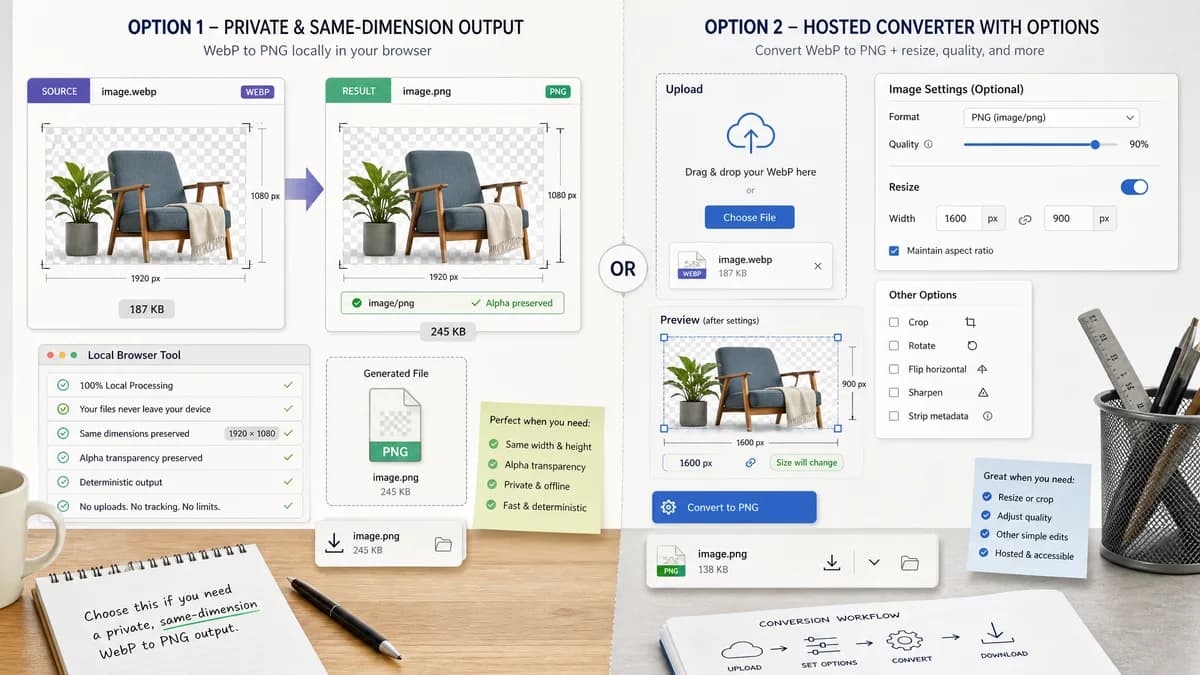
WebP to PNG Converter is the baseline in this comparison: Convert WebP images to PNG locally with image/png output checks, .png filenames, preserved dimensions, Blob validation, and alpha-preserving transparency handling.
Compare TextFaker's deterministic WebP to PNG page with Online-Convert's hosted converter and optional image controls.
Quick verdict
Use TextFaker for private, same-dimension WebP to PNG output. Use Online-Convert when hosted conversion with resize or other optional settings is the desired workflow.
How WebP to PNG Converter fits
TextFaker should convert WebP to PNG locally with a fixed output contract: image/png MIME, .png filename, preserved dimensions, generated Blob, and alpha preservation.
How Online-Convert fits
Online-Convert offers a hosted WebP to PNG converter with optional settings such as quality and size changes. It is stronger for users who want conversion plus simple transformations in one hosted form.
Side-by-side comparison
| Decision point | WebP to PNG Converter | Online-Convert | Takeaway |
|---|---|---|---|
| Dimension behavior | Our workflowShould preserve original WebP dimensions by default and validate them in the result. | Competitor workflowOffers optional width and height changes on the conversion page. | TextFaker should emphasize same-size conversion; Online-Convert fits resizing. |
| Output target | Our workflowDedicated image/png output only. | Competitor workflowDedicated route outputs PNG but lives in a broader conversion environment. | Both match the format pair, but TextFaker should be more constrained. |
| Settings complexity | Our workflowMinimal settings because PNG output has no lossy quality slider requirement. | Competitor workflowShows optional quality and size controls. | Online-Convert is stronger for users who want transformations. |
| Privacy model | Our workflowLocal browser conversion should avoid uploading the original file. | Competitor workflowHosted conversion processes the uploaded file through the service. | TextFaker wins privacy-sensitive use cases. |
| Transparency | Our workflowShould preserve alpha and report that no matte flattening was applied. | Competitor workflowPNG supports alpha, but transparency validation is not the main surfaced result check. | TextFaker should make alpha behavior inspectable. |
| Testability | Our workflowCan be tested with WebP fixtures for MIME, extension, Blob, dimensions, and alpha. | Competitor workflowHosted page behavior is visible to users but not part of TextFaker's automated test suite. | TextFaker can be objectively validated in repo tests. |
Use WebP to PNG Converter when
- Same-dimension local WebP to PNG conversion
- Alpha-preserving PNG output without extra settings
- Users who need a predictable result for QA
Use Online-Convert when
- Hosted conversion with resize controls
- Users who want optional compression or image adjustments
- Broad online conversion across many file types
Detailed comparison
Quick verdict
Online-Convert is a closer competitor for users who want conversion plus resizing. TextFaker should intentionally keep the dedicated page focused on faithful WebP to PNG conversion.
No quality slider
Unlike WebP or JPG output pages, a PNG output page should not expose a quality slider unless the implementation actually changes PNG compression. The safer first release is deterministic PNG export.
Dimension checks
Preserved dimensions should be a first-class result value because hosted competitors often mix conversion with resizing. This gives TextFaker a clear correctness promise.
Generated detail image
Use a 16:9 image with a dimension ruler beside matching WebP and PNG previews, plus a small checkmark row for same width and height.
Research notes
- Online-Convert's official page identifies the conversion from Google Web Picture files to Portable Network Graphics.
- The page shows optional settings such as quality and size changes.
- This makes Online-Convert a useful comparison for deciding whether TextFaker should expose or avoid extra controls.
Official source
The only outbound competitor link on this page is placed here for source checking after the comparison.
Official Online-Convert source