
WebP to PNG Converter vs XnConvert
WebP to PNG Converter is the baseline in this comparison: Convert WebP images to PNG locally with image/png output checks, .png filenames, preserved dimensions, Blob validation, and alpha-preserving transparency handling.
Compare TextFaker's browser-local single-purpose converter with XnConvert's desktop batch image conversion app.
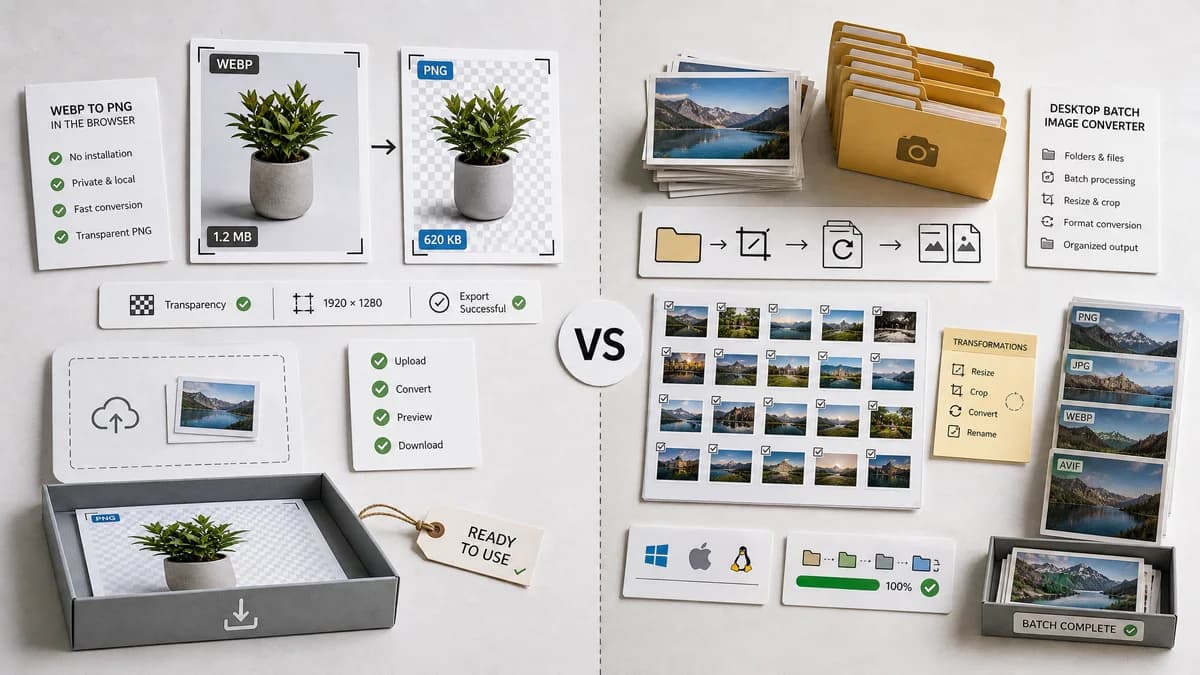
Quick verdict
Use TextFaker for quick no-install browser conversion. Use XnConvert when a desktop batch workflow, folders of images, and repeated transformations are required.
How WebP to PNG Converter fits
TextFaker should be optimized for quick WebP to PNG conversion in the browser, with transparent PNG output and visible technical result checks.
How XnConvert fits
XnConvert is a desktop batch image converter and resizer for Windows, macOS, and Linux. It supports many common formats, including WebP and PNG, and is stronger for processing folders or photo collections.
Side-by-side comparison
| Decision point | WebP to PNG Converter | XnConvert | Takeaway |
|---|---|---|---|
| Installation | Our workflowRuns in the browser after visiting the page. | Competitor workflowRequires installing a desktop application. | TextFaker is lighter for occasional use. |
| Batch processing | Our workflowDedicated page should prioritize one-file correctness unless multi-file is already part of the family pattern. | Competitor workflowOfficial page emphasizes batch conversion and processing multiple files and folders. | XnConvert is stronger for large batches. |
| Format support | Our workflowWebP input to PNG output only. | Competitor workflowSupports many image formats including JPEG, PNG, GIF, WebP, camera RAW, AVIF, HEIC, and others. | XnConvert is broader. |
| Privacy model | Our workflowLocal browser processing keeps the file on the user's device. | Competitor workflowDesktop local processing also keeps files on the user's device. | Both can be no-upload workflows. |
| Transformation tools | Our workflowNo extra transformations beyond conversion and validation. | Competitor workflowSupports many actions such as resize, crop, color adjustments, and filters. | XnConvert is better for editing batches. |
| Output validation | Our workflowShould expose MIME, extension, dimensions, Blob, and alpha checks in the UI. | Competitor workflowDesktop output can be inspected, but the app is built around batch setup and actions rather than a web validation report. | TextFaker is clearer for a single file result. |
Use WebP to PNG Converter when
- One-off WebP to PNG conversion without installing a desktop app
- Private browser-local conversion with immediate download
- Users who need clear result fields rather than a batch preset
Use XnConvert when
- Large batch image conversion jobs
- Desktop workflows across folders and photo collections
- Users who want resize, crop, watermark, filter, and other batch actions
Detailed comparison
Quick verdict
XnConvert is a better desktop batch product. TextFaker should target the simpler moment when a user has one WebP file and needs a PNG now.
Workflow separation
Do not try to make the dedicated page a full desktop batch editor. That would blur the difference from XnConvert and from TextFaker's general Image Format Converter.
Local privacy parity
Unlike hosted converters, XnConvert can also keep files local. TextFaker's advantage is no installation and clearer browser result validation, not privacy alone.
Generated detail image
Use a 16:9 generated image contrasting a desktop batch list with a clean browser-local single conversion result, emphasizing no-install use.
Research notes
- XnConvert's official page describes it as a fast, powerful, free cross-platform batch image converter.
- The official page lists WebP and PNG among many supported formats and mentions more than 80 actions.
- This comparison should classify XnConvert as desktop freeware, not hosted SaaS and not open source.
Official source
The only outbound competitor link on this page is placed here for source checking after the comparison.
Official XnConvert source