
Open Source Alternatives to Adobe Express
WebP to PNG Converter is a browser-based alternative for users who need this focused result without installing a proprietary desktop app or entering a larger hosted workflow.
This research compares that workflow with Adobe Express while keeping the outbound source link at the bottom after the analysis.
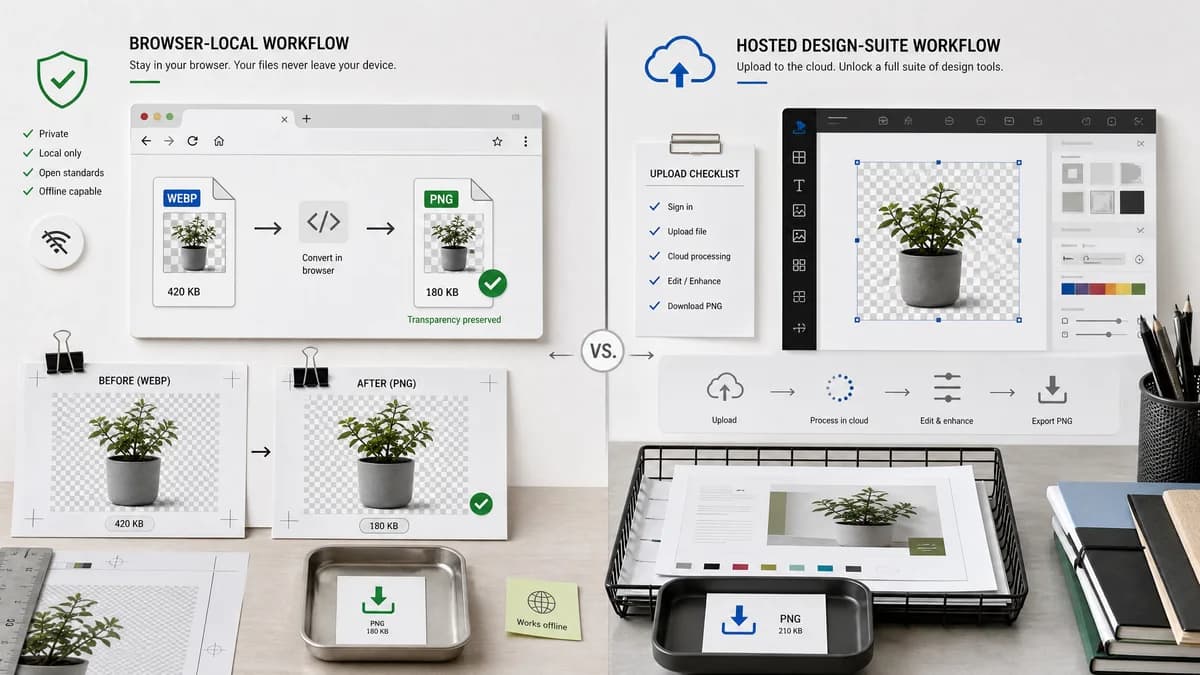
Why WebP to PNG Converter fits
TextFaker should offer a narrow browser-local WebP to PNG page that verifies PNG output, preserves alpha, and avoids adding design-editor steps to a simple conversion task.
What Adobe Express offers
Adobe Express presents a fast, free WebP to PNG feature that uploads an image and downloads a new PNG, within Adobe's broader design product ecosystem.
Open alternative signals
Product type
WebP to PNG ConverterDedicated utility page
Adobe ExpressDesign suite feature
Editing tools
WebP to PNG ConverterConversion-focused, no design canvas needed
Adobe ExpressBroader editor and creative workflow
Processing promise
WebP to PNG ConverterBrowser-local conversion target
Adobe ExpressHosted upload/download feature
Output checks
WebP to PNG Converterimage/png, .png filename, dimensions, Blob, and alpha checks
Adobe ExpressHigh-quality PNG download messaging
Decision guide
Fast local conversion of WebP assets to PNG for compatibility, QA, and design handoff.
Users who want conversion together with Adobe Express editing, templates, and design workflows.
Side-by-side open source alternative comparison
| Decision point | WebP to PNG Converter | Adobe Express | Takeaway |
|---|---|---|---|
| Task fit | Our workflowOptimized for direct WebP to PNG conversion. | Proprietary workflowConversion is part of a larger creative suite. | TextFaker should minimize friction for users who do not need editing. |
| Transparency | Our workflowTransparent WebP should remain transparent in the PNG file. | Proprietary workflowAdobe page notes PNG is useful for transparent backgrounds. | Alpha preservation is relevant to both tools and must be tested. |
| Workflow complexity | Our workflowUpload locally, convert, download. | Proprietary workflowLaunch converter, upload, optionally use design features, download. | A smaller utility can be faster for repeat conversion tasks. |
| Best audience | Our workflowDevelopers, QA reviewers, and designers checking files locally. | Proprietary workflowCreators already working in Adobe Express. | Audience language should be pragmatic and file-focused. |
| Generated assets | Our workflowUse generated transparent graphics to demonstrate output behavior. | Proprietary workflowAdobe's page is product-led and design-suite branded. | TextFaker can show neutral technical examples. |
| Shared library reuse | Our workflowUse the existing TextFaker image conversion core. | Proprietary workflowExternal product implementation is opaque. | Internal adapter reuse gives consistent behavior with sibling converters. |
Detailed research
Positioning
Adobe Express is better understood as a design-suite route. TextFaker should focus on the file utility use case: I have a WebP and need a PNG that keeps transparent pixels.
- Avoid competing on templates or design editing.
- Compete on local processing and verifiable output.
- Use concise copy for designers and developers.
Content Notes
The page should explain when PNG is preferred: transparency, compatibility, screenshots, logos, and editors that do not accept WebP.
- Mention PNG may be larger than WebP.
- Mention no JPEG matte flattening.
- Mention output stays raster PNG, not vector.
Validation
Adobe Express quality claims mean TextFaker should use concrete verifications instead of vague quality language.
- Dimensions preserved.
- MIME image/png.
- Blob generated.
- Alpha retained.
Generated Images
Generated examples should show real use cases without brand confusion.
- Transparent logo mockup.
- Sticker graphic with shadow.
- Web icon with alpha edges.
Research notes
- Official Adobe Express material positions the converter as fast, easy, free, and part of a larger creative tool.
- The TextFaker comparison should acknowledge Adobe Express is better for design editing, while TextFaker is narrower and more inspectable.
- Generated example images should avoid Adobe brand elements and use original generic visuals.
Official source
The proprietary product link is included once here for source checking after the alternative analysis.
Official Adobe Express source